Loading
Get Authorization For Release Of Information - Healthsmart - Volusia
How it works
-

Open form follow the instructions
-

Easily sign the form with your finger
-

Send filled & signed form or save
How to fill out the Authorization For Release Of Information - HealthSmart - Volusia online
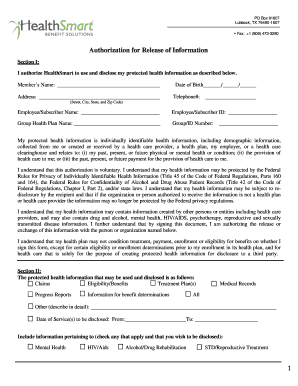
Filling out the Authorization For Release Of Information - HealthSmart - Volusia form online is an essential process for individuals looking to manage their health information securely. This guide provides step-by-step instructions to help you navigate through each section of the form with clarity and ease.
Follow the steps to complete the form accurately and efficiently.
- Press the ‘Get Form’ button to access the Authorization For Release Of Information - HealthSmart - Volusia form and open it in your preferred editor.
- In Section I, enter your name as the member requesting the release of information, followed by your date of birth, telephone number, and complete address including street, city, state, and ZIP code.
- Provide the name of your employee or subscriber, along with their respective ID number and the name of your group health plan and group/ID number.
- Indicate your authorization for HealthSmart to use and disclose your protected health information by checking the appropriate boxes that confirm your understanding of the privacy regulations and the scope of the information being shared.
- In Section II, specify the types of information you wish to be disclosed, such as claims, eligibility, treatment plans, or any other relevant details. Enter the date of service to be disclosed as well.
- Indicate which specific types of sensitive information, if any, you consent to be disclosed by checking the relevant boxes like mental health, HIV/AIDS, or drug rehabilitation.
- In Section III, list the individuals, providers, or organizations authorized to receive your protected health information, providing the names and relationships as applicable.
- In Section IV, reaffirm your authorization for HealthSmart to release your information by understanding the implications if the information is disclosed to non-healthcare organizations.
- Complete Section V by indicating the expiration date of the authorization—if no date is mentioned, the authorization will expire at the termination of coverage.
- Finally, sign and date the form, ensuring it is signed by the member or their legal representative if necessary, before submitting it via mail or fax to HealthSmart.
Complete your Authorization For Release Of Information - HealthSmart - Volusia online today to manage your health records effectively.
Release of information (ROI) is the process of providing access to protected health information (PHI) to an individual or entity authorized to receive or review it.
Industry-leading security and compliance
US Legal Forms protects your data by complying with industry-specific security standards.
-
In businnes since 199725+ years providing professional legal documents.
-
Accredited businessGuarantees that a business meets BBB accreditation standards in the US and Canada.
-
Secured by BraintreeValidated Level 1 PCI DSS compliant payment gateway that accepts most major credit and debit card brands from across the globe.