Loading
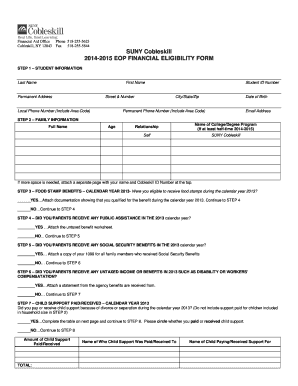
Get 2014-2015 - Cobleskill - Cobleskill
How it works
-

Open form follow the instructions
-

Easily sign the form with your finger
-

Send filled & signed form or save
How to fill out the 2014-2015 - Cobleskill - Cobleskill online
Completing the 2014-2015 Cobleskill online form is an important step in determining financial eligibility for assistance. This guide provides clear and supportive instructions to help users navigate each section of the form effectively.
Follow the steps to successfully complete your form online.
- Click the ‘Get Form’ button to obtain the form and open it in the editor.
- Enter your student information in Step 1, including your last name, first name, permanent address, local phone number, student ID number, date of birth, permanent phone number, and email address.
- In Step 2, provide family information by listing full names, ages, and relationships of family members. Indicate the college and degree program if applicable. If more space is needed, attach a separate page with your name and Cobleskill ID number at the top.
- For Step 3, indicate whether you were eligible for food stamps in the calendar year 2013 by selecting 'Yes' or 'No.' If 'Yes,' attach documentation showing eligibility.
- In Step 4, respond to whether you or your parents received any public assistance in the 2013 calendar year. Attach the untaxed benefit worksheet if applicable.
- In Step 5, answer whether you or your parents received any Social Security benefits in 2013. If 'Yes,' attach a copy of the 1099 forms for all family members who received these benefits.
- Step 6 requires you to specify if you or your parents received any untaxed income or benefits in 2013 such as disability or workers’ compensation. Attach a statement from the agency providing the benefits if applicable.
- Step 7 asks if you paid or received child support in 2013 due to divorce or separation. Complete the associated table and circle whether you paid or received child support.
- In Steps 8 and 9, provide your and your spouse's or parent's tax information for the calendar year 2013, following the instructions related to tax transcripts and income verification.
- Finally, in Step 10, you must sign the certification section to affirm that all the information reported is complete and correct, including signatures from the student and parent or spouse if applicable.
- After completing the form, you can save changes, download, print, or share your form as needed.
Complete your 2014-2015 Cobleskill online form today to ensure you have the necessary financial assistance.
Overview. SUNY Cobleskill is a public institution that was founded in 1911. It has a total undergraduate enrollment of 1,824 (fall 2021), its setting is rural, and the campus size is 902 acres. It utilizes a semester-based academic calendar.
Industry-leading security and compliance
US Legal Forms protects your data by complying with industry-specific security standards.
-
In businnes since 199725+ years providing professional legal documents.
-
Accredited businessGuarantees that a business meets BBB accreditation standards in the US and Canada.
-
Secured by BraintreeValidated Level 1 PCI DSS compliant payment gateway that accepts most major credit and debit card brands from across the globe.