Loading
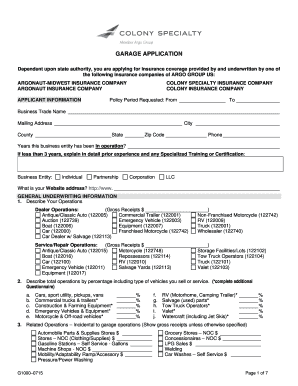
Get G1000-0715 Garage Application.doc
How it works
-

Open form follow the instructions
-

Easily sign the form with your finger
-

Send filled & signed form or save
How to fill out the G1000-0715 Garage Application.doc online
Filling out the G1000-0715 Garage Application online is an important step for obtaining insurance coverage for your garage operations. This guide will provide you with clear and detailed instructions on how to complete the form effectively.
Follow the steps to complete the garage application form.
- Click the ‘Get Form’ button to access the G1000-0715 Garage Application document in your online editor.
- Begin filling out the applicant information section. Provide your business trade name, mailing address, city, county, state, zip code, and phone number. Ensure to indicate the years your business has been in operation and provide additional information if applicable.
- Select the type of business entity you are applying as: individual, partnership, corporation, or LLC. Include your business website if applicable.
- Move on to the general underwriting information section. Describe your operations, including gross receipts for relevant vehicle types to accurately represent your business activities.
- Complete the related operations section with any additional incidental operations, noting gross receipts as appropriate.
- Provide details about the locations of your garage operations, including all addresses.
- Answer questions regarding your ownership interest in other businesses, rental spaces, leasing operations, and vehicle loans. Make sure to provide accurate details in the sub-questions.
- Fill out the loss history for the past three years and provide careful details if there were any reported losses.
- Specify your coverage requests, detailing limits for garage liability, medical payments, and any specific vehicle or optional coverage you require.
- Review the general fraud statement and provide your signature, printing your name and the date. If applicable, include a witness and their signature, as well as details of your agent or broker.
- Once all sections are filled out thoroughly, save your changes. You can opt to download, print, or share the completed form as needed.
Complete your garage application form online today to ensure proper insurance coverage for your operations.
What to include in the Education Section of the resume: Name of your school. Location of the same. The degree obtained. Your field of study. Year of Graduation (if applicable) Your GPA (only if applicable)