Loading
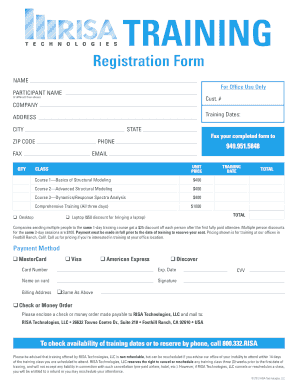
Get Registration Form - Risa Technologies
How it works
-

Open form follow the instructions
-

Easily sign the form with your finger
-

Send filled & signed form or save
How to fill out the Registration Form - RISA Technologies online
Filling out the Registration Form for RISA Technologies online is a straightforward process designed to streamline your registration for training. This guide will walk you through each section of the form to ensure you provide all necessary information accurately.
Follow the steps to successfully complete your registration form online.
- Click the ‘Get Form’ button to access the Registration Form and open it in your preferred editor.
- In the ‘Participant Name’ field, enter the full name of the person attending the training. If this differs from the name above, provide the different name.
- Fill in the ‘Company’ field with the name of the organization the participant represents.
- Input the training dates you would like to attend in the designated section.
- In the ‘Address’ section, provide the complete mailing address including state, city, and zip code.
- List a contact phone number in the ‘Phone’ field for any follow-up communication. Include a fax number if you wish to receive updates or confirmations via this method.
- Enter an email address in the ‘Email’ section for correspondence regarding the training.
- Choose the training course(s) you wish to register for by marking the appropriate selection(s) under ‘Class’. Note the prices next to each course.
- If registering for a comprehensive training package or multiple individuals, calculate the total cost and enter it in the ‘Total’ field.
- Select a payment method (credit card or check) and fill in the required payment details accordingly.
- If paying by credit card, provide the card number, expiration date, name on the card, signature, billing address, and CVV. If using a check, enclose it with the form.
- Review all entered information for accuracy before submitting.
- Save your changes, then download, print, or share the completed form as needed.
Take the next step in your professional development by completing your Registration Form online today!
Email: support@risa.com. Make sure you tell us your name, company name, serial number or Key ID, phone number, and a problem description. Phone Support:(949) 951-5815. Feel free to call, especially if you need a quick answer.
Industry-leading security and compliance
US Legal Forms protects your data by complying with industry-specific security standards.
-
In businnes since 199725+ years providing professional legal documents.
-
Accredited businessGuarantees that a business meets BBB accreditation standards in the US and Canada.
-
Secured by BraintreeValidated Level 1 PCI DSS compliant payment gateway that accepts most major credit and debit card brands from across the globe.