Loading
Form preview
  • US Legal Forms
  • Other Templates
  • More Forms
  • More Uncategorized Forms
  • Fill Out Xxxxxxxxxxxxxxxxxxxhd Form

Get Fill Out Xxxxxxxxxxxxxxxxxxxhd Form

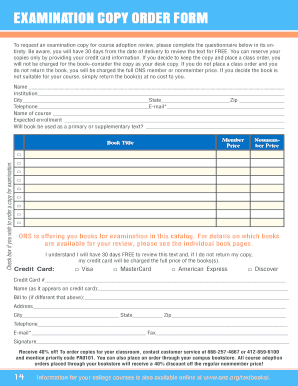
From the date of delivery to review the text for FREE. You can reserve your copies only by providing your credit card information. If you decide to keep the copy and place a class order, you will not be charged for the book consider the copy as your desk copy. If you do not place a class order and you do not return the book, you will be charged the full ONS member or nonmember price. If you decide the book is not suitable for your course, simply return the book(s) at no cost to you. Name.

How it works

  1. Open form

    Open form follow the instructions

  2. Easily sign form

    Easily sign the form with your finger

  3. Share form

    Send filled & signed form or save

How to fill out the Fill Out Xxxxxxxxxxxxxxxxxxxhd Form online

This guide provides clear and user-friendly instructions for filling out the Fill Out Xxxxxxxxxxxxxxxxxxxhd Form online. Follow the steps below to ensure that your request for an examination copy is accurately submitted.

Follow the steps to complete the form successfully.

  1. Press the ‘Get Form’ button to access the examination copy order form. This will open the document in an online editing interface.
  2. Fill in your personal information in the designated fields, including your name, institution, city, state, and zip code.
  3. Provide your contact details by entering your telephone number and email address. Make sure the email is correct as it may be used for correspondence.
  4. Complete the course information section by stating the name of the course and expected enrollment numbers.
  5. Indicate whether the book will be used as a primary or supplementary text by selecting the appropriate option.
  6. Choose the desired book title from the list and check the box if you wish to order an examination copy.
  7. Complete the credit card information section, including the type of card, the card number, and the name as it appears on the card.
  8. If applicable, provide billing information if it differs from your personal details, including the billing address, city, state, zip code, telephone number, email, and fax.
  9. Sign the form to acknowledge that you understand the terms regarding the examination copy and the charges that may apply if the book is not returned.
  10. After completing all sections, you can save your changes, download the completed form, print it, or share it as required.

Complete your examination copy order form online today and ensure your course materials are ready for review.

Get form

Experience a faster way to fill out and sign forms on the web. Access the most extensive library of templates available.
Get form

Related content

Gomez v. Perez
Jun 19, 1972 · behalf of herself and her illegitimate child in a Texas ... support has a...
Learn more

Related links form

Goldey Beacom Transcript Request Form Transcript Request Form - Cab Calloway School Of The Arts Transcript Request Form - Technical Education Center Osceola TeacherReady Transcript Request Form - Teacherready

Questions & Answers

Get answers to your most pressing questions about US Legal Forms API.

Contact support

A: Generally, when referring to a document of some kind, it's wise to stick to one or the other. And if you're writing for American audiences, “fill out” is preferred – “fill in” for the rest of us.

How to create fillable PDF files: Open Acrobat: Click on the “Tools” tab and select “Prepare Form.” Select a file or scan a document: Acrobat will automatically analyze your document and add form fields. Add new form fields: Use the top toolbar and adjust the layout using tools in the right pane. Save your fillable PDF:

Use eSignature to fill out a PDF form and sign it An interactive form contains fields that you can select or fill in, eliminating the need to print the form and complete it by hand.

You can fill out PDF forms in Google Drive on your Android device. On your Android device, open the Google Drive app. Tap the PDF that you want to fill out. Form Filling .

How to fill and sign a PDF form: Open a PDF document in Acrobat. Click the “Fill & Sign” tool in the right pane. Fill out your form: Complete form filling by clicking a text field and typing or adding a text box. ... Sign your form: Click “Sign” in the toolbar at the top of the page. ... Send your form:

0:40 3:00 How To Sign and Fill Out a PDF in Gmail - YouTube YouTube Start of suggested clip End of suggested clip And. If I want to sign something like down here I can use this drawing tool and draw a signatureMoreAnd. If I want to sign something like down here I can use this drawing tool and draw a signature like. So that's my real signature. Or you can use this sign tool. So it has zero save signatures.

Fill out PDF forms in Google Drive On your Android device, open the Google Drive app. Tap the PDF that you want to fill out. At the bottom right, tap Edit. Form Filling . ... Enter your information in the PDF form. At the top right, tap Save. To save as a copy, click More.

Get This Form Now!

Use professional pre-built templates to fill in and sign documents online faster. Get access to thousands of forms.
Get form
If you believe that this page should be taken down, please follow our DMCA take down processhere.
Get Fill Out Xxxxxxxxxxxxxxxxxxxhd Form
Get form
  • Adoption
  • Bankruptcy
  • Contractors
  • Divorce
  • Home Sales
  • Employment
  • Identity Theft
  • Incorporation
  • Landlord Tenant
  • Living Trust
  • Name Change
  • Personal Planning
  • Small Business
  • Wills & Estates
  • Packages A-Z
  • Affidavits
  • Bankruptcy
  • Bill of Sale
  • Corporate - LLC
  • Divorce
  • Employment
  • Identity Theft
  • Internet Technology
  • Landlord Tenant
  • Living Wills
  • Name Change
  • Power of Attorney
  • Real Estate
  • Small Estates
  • Wills
  • All Forms
  • Forms A-Z
  • Other Templates
  • Legal Hub
  • About Us
  • Help Portal
  • Legal Resources
  • Blog
  • Affiliates
  • Contact Us
  • Delete My Account
  • Site Map
  • Industries
  • Forms in Spanish
  • Localized Forms
  • State-specific Forms
  • Forms Kit
  • Real Estate Handbook
  • All Guides
  • Notarize
  • Incorporation services
  • For Consumers
  • For Small Business
  • For Attorneys
  • USLegal
  • FormsPass
  • pdfFiller
  • signNow
  • altaFlow
  • DocHub
  • Instapage
Form Packages
  • Adoption
  • Bankruptcy
  • Contractors
  • Divorce
  • Home Sales
  • Employment
  • Identity Theft
  • Incorporation
  • Landlord Tenant
  • Living Trust
  • Name Change
  • Personal Planning
  • Small Business
  • Wills & Estates
  • Packages A-Z
Form Categories
  • Affidavits
  • Bankruptcy
  • Bill of Sale
  • Corporate - LLC
  • Divorce
  • Employment
  • Identity Theft
  • Internet Technology
  • Landlord Tenant
  • Living Wills
  • Name Change
  • Power of Attorney
  • Real Estate
  • Small Estates
  • Wills
  • All Forms
  • Forms A-Z
  • Other Templates
Customer Service
  • Legal Hub
  • About Us
  • Help Portal
  • Legal Resources
  • Blog
  • Affiliates
  • Contact Us
  • Delete My Account
  • Site Map
  • Industries
  • Forms in Spanish
  • Localized Forms
  • State-specific Forms
  • Forms Kit
Legal Guides
  • Real Estate Handbook
  • All Guides
Prepared for you
  • Notarize
  • Incorporation services
Our Customers
  • For Consumers
  • For Small Business
  • For Attorneys
Our Sites
  • USLegal
  • FormsPass
  • pdfFiller
  • signNow
  • altaFlow
  • DocHub
  • Instapage
Social Media
Call us now toll free:
+1 833 426 79 33
As seen in:
© Copyright 1999-2026 airSlate Legal Forms, Inc. 17 Station Street, Ste. 203, Brookline, MA 02445
  • Your Privacy Choices
  • Terms of Service
  • Privacy Notice
  • Content Takedown Policy
  • Bug Bounty Program