Loading
Get Authorization Agreement For Direct Deposit
How it works
-

Open form follow the instructions
-

Easily sign the form with your finger
-

Send filled & signed form or save
How to fill out the Authorization Agreement For Direct Deposit online
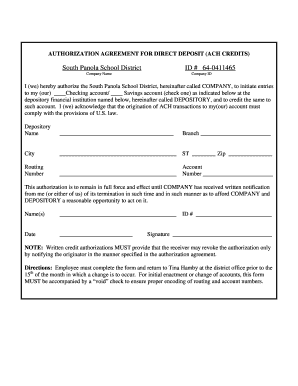
Filling out the Authorization Agreement For Direct Deposit is an essential step for users wishing to manage their direct deposit preferences. This guide offers a comprehensive overview, ensuring that you complete the form accurately and efficiently.
Follow the steps to fill out the form successfully.
- Click ‘Get Form’ button to obtain the form and open it in your preferred editing tool.
- Identify your account type by selecting either 'Checking account' or 'Savings account' in the specified section.
- Enter the name of your depository financial institution in the designated field.
- Provide the branch information, including the city and state of the depository.
- Fill in the zip code associated with your depository institution.
- Input the routing number for your account, ensuring it is accurate to prevent any issues with transactions.
- Enter your account number in the designated field below the routing number.
- In the name(s) field, provide the name(s) of the account holder(s) as they appear on the account.
- Specify the date you are completing the form.
- Input any required identification number in the ID field, if applicable.
- Sign the form in the signature section to authorize the direct deposit.
- Once all fields are filled out accurately, save the changes. You can download, print, or share the form as needed.
Get started with your document completion online today.
Or you can download a blank Direct Deposit Information Form (PDF) and fill in the information yourself. For accounts with checks, a diagram on the form shows you where you can find the information you'll need.