Loading
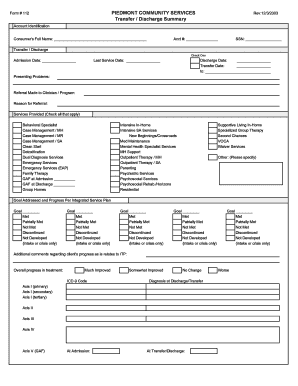
Get Discharge Summary Revisedpdf - Piedmont Community Services
How it works
-

Open form follow the instructions
-

Easily sign the form with your finger
-

Send filled & signed form or save
How to fill out the Discharge Summary Revisedpdf - Piedmont Community Services online
This guide provides users with clear, step-by-step instructions on how to complete the Discharge Summary Revisedpdf for Piedmont Community Services. Whether you are a user with previous experience or new to filling out forms, this guide ensures you can fill out the document accurately and efficiently.
Follow the steps to successfully complete the Discharge Summary form.
- Press the ‘Get Form’ button to obtain the Discharge Summary Revisedpdf, which will open in your preferred editor.
- Begin by entering the consumer's full name in the designated field at the top of the form, followed by the account number and social security number. Ensure accuracy to maintain proper identification.
- In the 'Transfer / Discharge' section, select the type of discharge by checking the corresponding option. Fill in the admission date, last service date, discharge date, and transfer date if applicable.
- Outline the presenting problems faced by the consumer in the appropriate field. This section provides context for the services rendered.
- Indicate any referrals made to clinicians or programs, providing the reason for referral if applicable.
- In the 'Services Provided' section, check all applicable services that were rendered, such as case management or outpatient therapy.
- For each goal addressed in the integrated service plan, indicate the progress made using the provided options: Met, Partially Met, Not Met, or Discontinued. Fill in up to five goals as necessary.
- Provide additional comments regarding the client's progress as related to the integrated treatment plan in the designated space.
- Indicate overall progress in treatment by selecting from the options: Much Improved, Somewhat Improved, No Change, or Worse.
- Document medications being transferred or discharged, along with dosage and any relevant comments.
- Fill out the reason for transfer or discharge, checking the appropriate box to specify the situation.
- Describe the client's condition at the time of transfer or discharge. Select from the available options to best reflect their status.
- In the 'Upon Discharge - Referred To' section, check all applicable options for agencies or individuals to whom the client is referred.
- Complete the recommendations and plan for follow-up if applicable.
- Collect the signatures from the consumer, any parent or guardian, the PCS staff representative, and the supervisor in the provided signature fields.
- Once all fields are completed, save your changes, and consider downloading or printing the form for your records or sharing it as needed.
Complete your Discharge Summary Revisedpdf online today to ensure accurate documentation.
Hospitals should provide written instructions covering at least these five topics: What activity you can do at home. Your diet. Follow-up appointment. Discharge medications. What to do if symptoms return or worsen.
Industry-leading security and compliance
US Legal Forms protects your data by complying with industry-specific security standards.
-
In businnes since 199725+ years providing professional legal documents.
-
Accredited businessGuarantees that a business meets BBB accreditation standards in the US and Canada.
-
Secured by BraintreeValidated Level 1 PCI DSS compliant payment gateway that accepts most major credit and debit card brands from across the globe.