Loading
Get B184
How it works
-

Open form follow the instructions
-

Easily sign the form with your finger
-

Send filled & signed form or save
How to fill out the B184 online
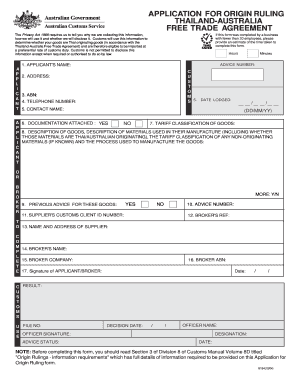
The B184 form is essential for individuals and businesses seeking to determine if their goods qualify as Thai originating under the Thailand-Australia Free Trade Agreement. This guide provides a clear, step-by-step approach to filling out the B184 online to ensure a smooth submission process.
Follow the steps to complete your B184 form online.
- Press the ‘Get Form’ button to access the B184 form and open it within the online editor.
- Enter the applicant's name in the designated field. Ensure that you spell your name correctly and include any necessary details.
- Provide your address accurately. This information is crucial for communication regarding your application.
- Input your Australian Business Number (ABN). This section is important for identifying your business.
- Fill in your telephone number including the area code.
- Specify the contact name for correspondence, if this is different from the applicant.
- Select the date you are lodging the form in the format of Day/Month/Year.
- Indicate whether you have attached any supporting documentation to the application.
- Enter the tariff classification of the goods concerned in your application.
- Provide a detailed description of the goods, including materials used in their manufacture, indicating whether they are Thai or Australian originating, and the classification of any non-originating materials.
- If applicable, note any previous advice received for these goods.
- Provide the supplier's customs client ID number if available.
- Input the broker’s reference.
- Include the name and address of the supplier.
- Enter the name of the broker dealing with your application.
- Fill in the broker company name and ABN.
- Sign the form as the applicant or broker, and date the signature to confirm your submission.
- Review all the information for accuracy. After completing the form, you can save changes, download, print, or share it as needed.
Complete your B184 form online today for a seamless submission experience.
Create a drop-down list Select the cells that you want to contain the lists. On the ribbon, select DATA > Data Validation. In the dialog box, set Allow to List. Click in Source, type the text or numbers (separated by commas, for a comma-delimited list) that you want in your drop-down list, and select OK.
Industry-leading security and compliance
US Legal Forms protects your data by complying with industry-specific security standards.
-
In businnes since 199725+ years providing professional legal documents.
-
Accredited businessGuarantees that a business meets BBB accreditation standards in the US and Canada.
-
Secured by BraintreeValidated Level 1 PCI DSS compliant payment gateway that accepts most major credit and debit card brands from across the globe.