Loading
Form preview
  • US Legal Forms
  • Form Library
  • More Forms
  • More Uncategorized Forms
  • Elac Transcripts

Get Elac Transcripts

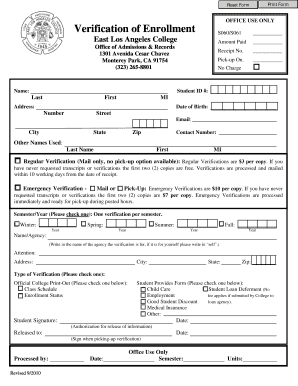
Print Form Reset Form OFFICE USE ONLY Verification of Enrollment S060/S061 Amount Paid Name: Pick-up On. No Charge Office of Admissions & Records 1301 Avenida Cesar Chavez Monterey Park, CA 91754.

How it works

  1. Open form

    Open form follow the instructions

  2. Easily sign form

    Easily sign the form with your finger

  3. Share form

    Send filled & signed form or save

How to fill out the Elac Transcripts online

Filling out the Elac Transcripts form online can be a straightforward process if you follow the proper steps. This guide will provide you with clear, step-by-step instructions on how to accurately complete each section of the form and obtain your transcript efficiently.

Follow the steps to complete your Elac Transcripts form online.

  1. Press the ‘Get Form’ button to access the Elac Transcripts form and open it for editing.
  2. Begin by entering your personal information in the designated fields. Fill in your name, student ID number, and date of birth to ensure the correct identification.
  3. Provide your contact details, including your address, email, and phone number. This information is essential for processing your request and for any potential follow-up.
  4. If you have used other names previously, include those in the specified area to help verify your identity.
  5. Select the type of verification you need. Indicate whether you require regular or emergency verification and choose the delivery method (mail or pick-up) accordingly.
  6. In the semester/year section, check the box that corresponds to the semester for which you are requesting verification.
  7. Input the name or agency for which the verification is needed. If it is only for your personal records, write ‘self’.
  8. Choose the type of verification required by checking the appropriate box, such as class schedule or enrollment status.
  9. Sign and date the form to authorize the release of your academic information.
  10. After completing all required fields, review the information for accuracy. Once you are satisfied with the entries, save your changes, and then download, print, or share the completed form as needed.

Start filling out your Elac Transcripts form online today to receive your academic verification quickly.

Get form

Experience a faster way to fill out and sign forms on the web. Access the most extensive library of templates available.
Get form

Related content

ELAC and DELAC FAQs - Resources (CA Dept of...
Do ELAC and DELAC requirements, laws, and regulations still apply during the ... This...
Learn more
Enrollment Verification & Transcript Request...
Official LACCD Transcripts: Effective Fall 2017 LACCD transitioned to a District wide...
Learn more
Stone tablet (Lizardman Temple) - OSRS Wiki
Jan 10, 2019 — TranscriptEdit. Player: It reads: Record of Construction by Overseer...
Learn more

Related links form

PI-1 New Application - Oregon.gov - Oregon Application For Retc Oregon Form Business Contact Change Form - Oregon.gov - Oregon Form OR-19

Questions & Answers

Get answers to your most pressing questions about US Legal Forms API.

Contact support

Emergency Transcripts are available. The fee is $7.00 each copy if student has not received free copies; each additional Emergency Transcript is $10.00 per copy.

Delivery Method: Paper – As with the “Myself” tab, you can have your transcript delivered in a sealed envelope to any physical address worldwide.

If you are requesting your transcript to be mailed, the normal delivery method is through first class mail. Transcripts are produced one to three days after your order is received. Allow another five to seven days for delivery via United States Postal Service.

Parchment sends transcripts to receiving institutions when schools approve the order and upload the transcript records to Parchment. Parchment notifies the student, via email, as soon as the school has made the student's records available to Parchment. Parchment sends the electronic transcript immediately.

To order transcript through student portal: Log on to the student portal. Click on "Academic Records" Click on "Official Transcript Requests" You are now on the Parchment transcript ordering website. If you have never used Parchment ordering service before, click on New Learner Account.

If the recipient says they have not received it, they need to log in to their Parchment account and they will see the transcript in the Inbox. Download Confirmed means that the document has been downloaded. If the recipient says they do not have it, it is possible that another administrator downloaded it.

A: Normally, U.S. Mail delivery requires 3-7 business days. Then once the transcript has been received, it can take the school 4-6 weeks to process it and make the necessary entries in their computer system.

If they didn't receive the email, it may be in their Spam folder. If they still don't have it, let us know and we can resend the email. U.S. Mail typically requires up to seven business days for delivery.

Get This Form Now!

Use professional pre-built templates to fill in and sign documents online faster. Get access to thousands of forms.
Get form
If you believe that this page should be taken down, please follow our DMCA take down processhere.

Industry-leading security and compliance

US Legal Forms protects your data by complying with industry-specific security standards.
  • In businnes since 1997
    25+ years providing professional legal documents.
  • Accredited business
    Guarantees that a business meets BBB accreditation standards in the US and Canada.
  • Secured by Braintree
    Validated Level 1 PCI DSS compliant payment gateway that accepts most major credit and debit card brands from across the globe.
Get Elac Transcripts
Get form
  • Adoption
  • Bankruptcy
  • Contractors
  • Divorce
  • Home Sales
  • Employment
  • Identity Theft
  • Incorporation
  • Landlord Tenant
  • Living Trust
  • Name Change
  • Personal Planning
  • Small Business
  • Wills & Estates
  • Packages A-Z
  • Affidavits
  • Bankruptcy
  • Bill of Sale
  • Corporate - LLC
  • Divorce
  • Employment
  • Identity Theft
  • Internet Technology
  • Landlord Tenant
  • Living Wills
  • Name Change
  • Power of Attorney
  • Real Estate
  • Small Estates
  • Wills
  • All Forms
  • Forms A-Z
  • Form Library
  • Legal Hub
  • About Us
  • Help Portal
  • Legal Resources
  • Blog
  • Affiliates
  • Contact Us
  • Delete My Account
  • Site Map
  • Industries
  • Forms in Spanish
  • Localized Forms
  • State-specific Forms
  • Forms Kit
  • Real Estate Handbook
  • All Guides
  • Notarize
  • Incorporation services
  • For Consumers
  • For Small Business
  • For Attorneys
  • USLegal
  • FormsPass
  • pdfFiller
  • signNow
  • altaFlow
  • DocHub
  • Instapage
Form Packages
  • Adoption
  • Bankruptcy
  • Contractors
  • Divorce
  • Home Sales
  • Employment
  • Identity Theft
  • Incorporation
  • Landlord Tenant
  • Living Trust
  • Name Change
  • Personal Planning
  • Small Business
  • Wills & Estates
  • Packages A-Z
Form Categories
  • Affidavits
  • Bankruptcy
  • Bill of Sale
  • Corporate - LLC
  • Divorce
  • Employment
  • Identity Theft
  • Internet Technology
  • Landlord Tenant
  • Living Wills
  • Name Change
  • Power of Attorney
  • Real Estate
  • Small Estates
  • Wills
  • All Forms
  • Forms A-Z
  • Form Library
Customer Service
  • Legal Hub
  • About Us
  • Help Portal
  • Legal Resources
  • Blog
  • Affiliates
  • Contact Us
  • Delete My Account
  • Site Map
  • Industries
  • Forms in Spanish
  • Localized Forms
  • State-specific Forms
  • Forms Kit
Legal Guides
  • Real Estate Handbook
  • All Guides
Prepared for you
  • Notarize
  • Incorporation services
Our Customers
  • For Consumers
  • For Small Business
  • For Attorneys
Our Sites
  • USLegal
  • FormsPass
  • pdfFiller
  • signNow
  • altaFlow
  • DocHub
  • Instapage
Social Media
Call us now toll free:
+1 833 426 79 33
As seen in:
© Copyright 1999-2026 airSlate Legal Forms, Inc. 3720 Flowood Dr, Flowood, Mississippi 39232
  • Your Privacy Choices
  • Terms of Service
  • Privacy Notice
  • Content Takedown Policy
  • Bug Bounty Program