Loading
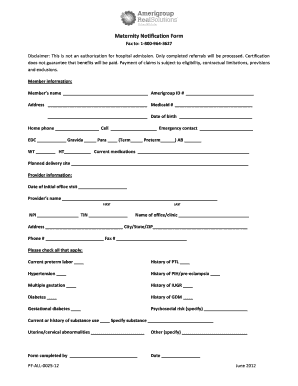
Get Maternity Notification Form - Providers Amerigroup
How it works
-

Open form follow the instructions
-

Easily sign the form with your finger
-

Send filled & signed form or save
How to fill out the Maternity Notification Form - Providers Amerigroup online
Completing the Maternity Notification Form - Providers Amerigroup online is an important step in ensuring that maternity care is coordinated effectively. This guide will walk you through each section of the form, providing clear instructions and helpful tips for users of all experience levels.
Follow the steps to accurately complete the form online.
- Press the ‘Get Form’ button to access the Maternity Notification Form and open it in your chosen online editor.
- Begin by filling in the member information at the top of the form. Include the member's full name, Amerigroup ID number, address, Medicaid number, date of birth, home and cell phone numbers, and emergency contact details.
- In the next section, provide the expected date of confinement (EDC), gravida and para information, including counts for term and preterm pregnancies as well as any abortions or miscarriages. Additionally, enter the member's weight (WT) and height (HT).
- List any current medications the member is taking in the designated field. Ensure this information is accurate to facilitate appropriate care.
- Indicate the planned delivery site in the provided space. This can include the name of the hospital or birthing center.
- In the provider information section, enter the date of the initial office visit, the provider’s full name (first and last), their NPI, TIN, and the name of the office or clinic.
- Fill in the address, city, state, ZIP code, phone number, and fax number for the provider’s office.
- Check all applicable boxes relating to the member’s medical history and current conditions, including but not limited to preterm labor, hypertension, diabetes, or psychosocial risks. If applicable, specify details in the provided fields.
- Complete the 'Form completed by' section with your name and the date of completion.
- Once all fields have been filled, ensure that the information is correct. You can then choose to save changes, download the form, print it, or share it as needed.
Take the next step towards ensuring proper maternity care by completing the Maternity Notification Form online.
To write a winning radio advertising proposal, include the following elements - Introduction, Mission, Vision, Approach & services, Pricing details, Terms & conditions, and finally Signatures.