Loading
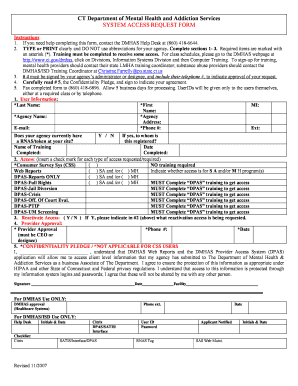
Get Form-system Access Request-pnp.doc. Trifoldtemplate3 - Ct
How it works
-

Open form follow the instructions
-

Easily sign the form with your finger
-

Send filled & signed form or save
How to use or fill out the Form-System Access Request-PNP.doc. TriFoldTemplate3 - Ct online
This guide provides a comprehensive overview of how to complete the Form-System Access Request-PNP.doc. TriFoldTemplate3 - Ct effectively. By following these steps, users can ensure they provide the necessary information accurately and efficiently.
Follow the steps to accurately complete your request form.
- Press the ‘Get Form’ button to obtain the form and open it in the document editor.
- Begin by filling out section 1, which includes your personal information. Ensure you type or print clearly and do not use abbreviations for your agency. Required fields are marked with an asterisk (*). Provide your last name, first name, middle initial, agency name, agency address, email, phone number, and extension.
- In section 2, indicate the type of access you require by checking the appropriate boxes for Consumer Survey System (CSS), Web Reports, and other DPAS options. Note that some access types require completion of specific training programs, which you should mark accordingly.
- If you are requesting reactivation of access, answer the question in section 3 with a 'Yes' or 'No'. If yes, provide details in section 2 about the reactivated access.
- Proceed to section 4 where your agency’s administrator or designee must sign and provide their phone number. This signature is necessary for approving your request.
- Read through and sign section 5, the Confidentiality Pledge, to indicate your agreement to protect client information in accordance with relevant privacy regulations.
- Once the form is complete, fax it to the provided number: (860) 418-6896. Remember to allow five business days for processing. Your UserID will only be provided to you directly.
Complete your access request form online today!
How to make a brochure on Google Docs Choose your template option. On your homepage, navigate to the top right corner, which has a "Template Gallery" option. ... Customize your brochure. Once you've selected the "General Brochure" option, the program opens a template you can use to get started. ... Share your brochure.
Industry-leading security and compliance
US Legal Forms protects your data by complying with industry-specific security standards.
-
In businnes since 199725+ years providing professional legal documents.
-
Accredited businessGuarantees that a business meets BBB accreditation standards in the US and Canada.
-
Secured by BraintreeValidated Level 1 PCI DSS compliant payment gateway that accepts most major credit and debit card brands from across the globe.