Loading
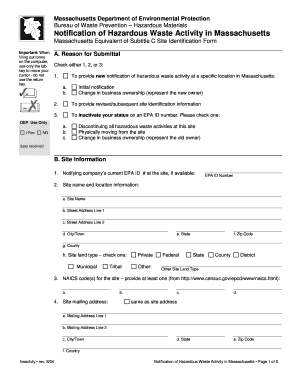
Get Notification Of Hazardous Waste Activity In Massachusetts - Mass.gov - Mass
How it works
-

Open form follow the instructions
-

Easily sign the form with your finger
-

Send filled & signed form or save
How to fill out the Notification Of Hazardous Waste Activity In Massachusetts - Mass.Gov - Mass online
Filling out the Notification of Hazardous Waste Activity in Massachusetts can seem daunting, but with clear guidance, you can navigate the process with confidence. This guide will provide you with step-by-step instructions to help you complete the form accurately and efficiently.
Follow the steps to complete your hazardous waste activity notification.
- Press the ‘Get Form’ button to access the form for your Notification of Hazardous Waste Activity.
- In the ‘Reason for Submittal’ section, select one of the given options (1, 2, or 3) to indicate why you are submitting this notification. Ensure to provide any required details, such as the new owner's information if applicable.
- Proceed to the 'Site Information' section. You will need to fill in the current EPA ID number (if available) and provide the site name, address, city/town, state, zip code, county, and type of land (municipal, tribal, etc.).
- Continue with the site’s NAICS code(s) that indicate the type of business activity at the site. You are required to provide at least one NAICS code.
- Complete the 'Site Mailing Address' section, which may be the same as the site address. If it differs, clearly fill in the mailing address details.
- Fill out the 'Site Contact Information' by providing the contact’s full name, mailing address, phone number, email address, and any applicable extensions.
- In the 'Legal Business Owner/Operator Information' section, provide the business owner/operator details, including the tax identification number and type of owner/operator.
- Provide the 'Legal Property Owner Information' if different from the legal business owner. Fill out the name, address, and other contact details.
- In the 'RCRA Hazardous Waste Activities' section, indicate if your facility generates or handles hazardous waste. Choose the appropriate generator status (LQG, SQG, VSQG) and provide additional relevant details as prompted.
- Complete the 'Used Oil and Other MA-regulated Activities' section by checking all applicable boxes that pertain to your site’s waste activities.
- In the 'Universal Waste Activities' section, indicate whether you handle large quantities of universal waste and specify the types of universal waste generated at your site.
- Fill in the 'Description of Hazardous Wastes' section by identifying waste codes for federally and state regulated hazardous wastes relevant to your operations.
- Provide any necessary comments in the designated section, ensuring to keep your comments concise.
- In the 'Certification' section, review the certification statement carefully, then have the legal owner or chief operating officer sign, print their name, official title, and date of signing.
- Once you have completed all sections, ensure to save the changes made to your form. You may also download and print a copy for your records, or share it as needed.
Take action now by completing your Notification of Hazardous Waste Activity online.
Federal EPA ID numbers are issued to handlers of RCRA (federal) hazardous waste. If you or your business generates more than 100 kilograms of RCRA hazardous waste and/or more than 1 kilogram of RCRA acutely hazardous waste per month, you will need to obtain a federal EPA ID number.
Industry-leading security and compliance
US Legal Forms protects your data by complying with industry-specific security standards.
-
In businnes since 199725+ years providing professional legal documents.
-
Accredited businessGuarantees that a business meets BBB accreditation standards in the US and Canada.
-
Secured by BraintreeValidated Level 1 PCI DSS compliant payment gateway that accepts most major credit and debit card brands from across the globe.