Loading
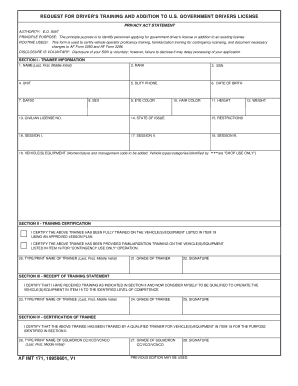
Get Af Form 171
How it works
-

Open form follow the instructions
-

Easily sign the form with your finger
-

Send filled & signed form or save
How to fill out the Af Form 171 online
Completing the Af Form 171 online is a straightforward process that enables users to apply for government driver’s training and licensing. This guide provides detailed instructions to help you navigate each section of the form efficiently.
Follow the steps to successfully complete the Af Form 171 online.
- Click 'Get Form' button to obtain the form and open it in your preferred editor.
- In Section I, fill in the 'Trainee Information'. Enter your name in the format of Last, First, Middle Initial, followed by your rank, Social Security Number (SSN), unit, duty phone, date of birth, Department of the Air Force Specialty Code (DAFSC), sex, eye color, hair color, height, weight, and civilian license number along with the state of issue and any restrictions.
- Proceed to Section II to complete the 'Training Certification'. Here, the trainer must certify that you have received training on the vehicle(s)/equipment listed. Ensure that the type and printed name of the trainer, their grade, and signature are provided correctly.
- In Section III, complete the 'Receipt of Training Statement'. As the trainee, certify that you have received the indicated training. Provide your type and printed name, grade, and signature in the corresponding fields.
- Advance to Section IV for 'Certification of Trainee'. The designated squadron commander or authorized person must certify your training. Fill in the type and printed name, grade, and signature of this individual.
- After reviewing all the information for accuracy, proceed to save your changes and choose to download, print, or share the completed form as necessary.
Start completing your Af Form 171 online today!
Long durability The reagents used in the MINIKITs have a shelf life of 5 years. And best of all - they are not subject to any transport restrictions.