Loading
Get Col. Of Rev.-form E-9-09/04 - Stlouis-mo.gov Is Down - Dynamic Stlouis-mo
How it works
-

Open form follow the instructions
-

Easily sign the form with your finger
-

Send filled & signed form or save
How to use or fill out the Col. Of Rev.-Form E-9-09/04 - Stlouis-mo.gov Is Down - Dynamic Stlouis-mo online
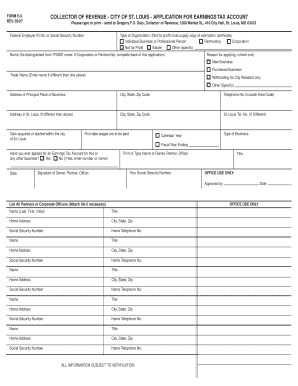
This guide provides clear and comprehensive instructions on how to fill out the Col. Of Rev.-Form E-9-09/04, an essential document for individuals and businesses applying for an earnings tax account in the City of St. Louis. Follow these steps to ensure a successful online submission of your application.
Follow the steps to complete your application accurately.
- Click the ‘Get Form’ button to obtain the form and open it in your preferred editor. This action will allow you to access the necessary fields of the Col. Of Rev.-Form E-9-09/04.
- Begin by entering your Federal Employer ID Number or Social Security Number in the designated field. This is essential for identifying your application.
- Select the type of organization from the provided options: Individual, Business or Professional Person, Partnership, Corporation, Not for Profit, Estate, or Other. If you choose ‘Not for Profit,’ be prepared to provide a copy of your exemption certificate.
- Provide your full name, ensuring it is distinguished from your trade name if applicable. If you are representing a corporation or partnership, complete the additional information requested at the back of the form.
- Indicate the reason for applying by checking the appropriate box, whether it is for a New Business or a Purchased Business.
- If you operate under a different trade name, enter it in the designated Trade Name field.
- Fill out the address of your principal place of business, including city, state, and zip code.
- Enter your telephone number, ensuring to include the area code.
- If your address in St. Louis differs from your principal place of business, complete that information as well, including the city, state, and zip code.
- Provide the date you acquired or started your business within the city of St. Louis, as well as the first date wages are to be paid to employees.
- Specify your type of business, whether it operates on a calendar year or fiscal year ending basis.
- Indicate whether you have previously applied for an Earnings Tax Account for this or any other business by checking 'Yes' or 'No.' If 'Yes,' provide the corresponding number or name.
- Print or type the name of the owner, partner, or officer responsible for this application. Complete the corresponding field with your Social Security Number.
- Securely sign your name in the designated signature field to validate the application. Include your title.
- If applicable, list all partners or corporate officers by entering their names, titles, home addresses, Social Security Numbers, and home telephone numbers.
- Once all fields are accurately filled, save your changes, and prepare to download, print, or share the completed form as needed.
Complete your earnings tax application online today for a smooth and efficient submission process.
Industry-leading security and compliance
US Legal Forms protects your data by complying with industry-specific security standards.
-
In businnes since 199725+ years providing professional legal documents.
-
Accredited businessGuarantees that a business meets BBB accreditation standards in the US and Canada.
-
Secured by BraintreeValidated Level 1 PCI DSS compliant payment gateway that accepts most major credit and debit card brands from across the globe.