Loading
Get Neweravailitymultipayer Era Form.xps - Practice Insight
How it works
-

Open form follow the instructions
-

Easily sign the form with your finger
-

Send filled & signed form or save
How to fill out the NewerAvailityMultipayer ERA Form.xps - Practice Insight online
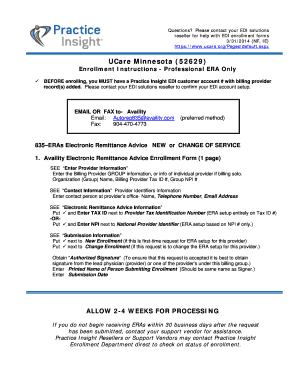
Filling out the NewerAvailityMultipayer ERA Form is essential for enrolling in electronic remittance advice services. This guide provides clear instructions to help you navigate through each section of the form in a user-friendly manner.
Follow the steps to complete the form efficiently.
- Click the ‘Get Form’ button to obtain the form and open it in the editor.
- Enter the billing provider group information in the designated fields. Include the organization (group) name, billing provider tax identification number (TIN), and group national provider identifier (NPI).
- Fill in the contact information by providing the name, telephone number, and email address of a contact person at your office.
- In the electronic remittance advice information section, select the option next to the applicable provider tax identification number (TIN) or national provider identifier (NPI).
Complete your documents online for timely processing.
Industry-leading security and compliance
US Legal Forms protects your data by complying with industry-specific security standards.
-
In businnes since 199725+ years providing professional legal documents.
-
Accredited businessGuarantees that a business meets BBB accreditation standards in the US and Canada.
-
Secured by BraintreeValidated Level 1 PCI DSS compliant payment gateway that accepts most major credit and debit card brands from across the globe.