Loading
Get Dhs Patent Clearance Form
How it works
-

Open form follow the instructions
-

Easily sign the form with your finger
-

Send filled & signed form or save
How to fill out the Dhs Patent Clearance Form online
Filling out the Dhs Patent Clearance Form online is a straightforward process designed to ensure clear communication and efficient requests. This guide provides step-by-step instructions to assist users in completing the form accurately and effectively.
Follow the steps to fill out the Dhs Patent Clearance Form online.
- Press the ‘Get Form’ button to access the Dhs Patent Clearance Form and open it in the editing tool.
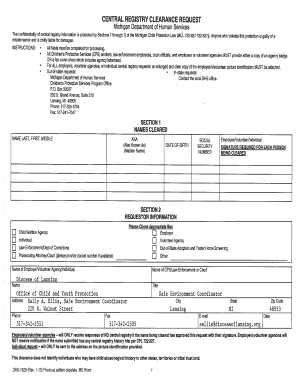
- In Section 1, enter the names to be cleared in the format 'Last, First, Middle.' Include any aliases using 'AKA' for individuals known by other names, such as a maiden name.
- Provide the date of birth for each individual being cleared in the designated field, following the format requested.
- Enter the social security number for each person in the appropriate box, ensuring accuracy to avoid processing delays.
- Make sure each person being cleared signs the form in the signature section to validate the request.
- In Section 2, select the appropriate requestor information type, such as Child Welfare Agency, Individual, or Law-Enforcement, by checking the relevant box.
- Enter the name of the employer or volunteer agency, or individual making the request, in the provided space.
- If applicable, fill in the name of the CPS, law-enforcement, or court office, including any docket numbers if available.
- Complete the contact information fields with the title, office address, phone number, fax number, email, city, state, and zip code for the requestor.
- Review all sections for accuracy and completeness to ensure timely processing, then save your changes, download, print, or share the completed form as needed.
Start completing the Dhs Patent Clearance Form online now to ensure your request is processed efficiently.
In Tennessee, you can also run property searches by visiting the county tax assessor's office in the county courthouse or by visiting the county's tax assessor's webpage.