Loading
Get Wealth Declaration Form
How it works
-

Open form follow the instructions
-

Easily sign the form with your finger
-

Send filled & signed form or save
How to fill out the Wealth Declaration Form online
Filling out the Wealth Declaration Form online can seem daunting, but with a clear understanding of each section, the process can be straightforward. This guide provides step-by-step instructions to help users complete the form accurately and efficiently.
Follow the steps to complete your Wealth Declaration Form online.
- Click ‘Get Form’ button to obtain the Wealth Declaration Form and open it in your preferred format for editing.
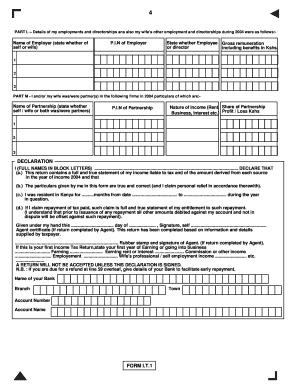
- In Part L, provide details of your employments and directorships, as well as those of your partner. List the name of the employer, specify whether it is for yourself or your partner, and include the employer's P.I.N. Indicate your role as either an employee or a director, and enter your gross remuneration including benefits in Kshs.
- Proceed to Part M, where you will detail any partnerships for which you or your partner were involved in during the year 2004. Include the name of the partnership, indicate if it is yours or your partner's, and provide the partnership's P.I.N. Specify the nature of income derived (such as rent or share of partnership business) and report the profit or loss in Kshs.
- In the Declaration section, ensure you print your full name in block letters. Confirm the following statements: that the return contains a true statement of your income liable to tax, that you were a resident in Kenya for the specified duration, and that any claim for repayment of tax is accurate. Remember to sign the declaration stating that the return is complete.
- If an agent has completed the return on your behalf, ensure that their rubber stamp and signature are included in the specified area. Indicate if this is your first income tax return and provide details as necessary.
- Finally, if applicable, provide your bank details to facilitate any refund you may be entitled to. Include the name of your bank, branch, town, account number, and account name.
- Review all information for accuracy before submitting. At this point, you have the option to save changes, download, print, or share the form as needed.
Complete and submit your Wealth Declaration Form online to ensure compliance and accuracy.
Enter your TSC Number then click Next. Enter your TSC Number in the next window and click on the Log in tab. After logging in, check on the Wealth Declaration tab at the top. Click on Basic Information . ... Enter the following details: Gender, Place of Birth, Marital Status and Postal address.