Loading
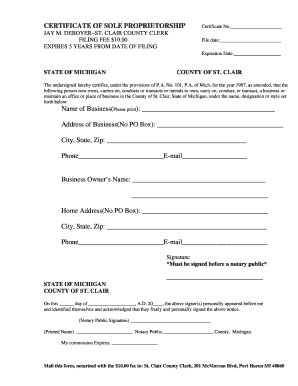
Get Proprietorship Certificate
How it works
-

Open form follow the instructions
-

Easily sign the form with your finger
-

Send filled & signed form or save
How to fill out the Proprietorship Certificate online
Filling out the Proprietorship Certificate online can be straightforward and efficient. This guide will walk you through each section of the form, ensuring you have all the necessary information to complete it correctly.
Follow the steps to accurately complete your Proprietorship Certificate.
- Press the ‘Get Form’ button to access the Proprietorship Certificate and open it in your editing platform.
- In the 'Certificate No.' field, enter the unique number assigned to your certificate. This number is usually provided by the issuing office.
- Fill in the 'File date' field with the date you are submitting the form. Include the day, month, and year.
- Enter the 'Expiration Date,' which is typically five years from the filing date. Ensure the date follows the same format as the file date.
- In the 'Name of Business' section, clearly print the legal name under which you will operate your business.
- Provide the full 'Address of Business,' excluding PO Box numbers. It should contain the street address, ensuring accuracy for legal reasons.
- Complete the 'City, State, Zip' field with the corresponding details for your business location.
- Fill in your business contact information, including 'Phone' and 'E-mail.' This will be used for any communication regarding your certificate.
- In the 'Business Owner’s Name' section, print your full legal name.
- Provide your home address in the 'Home Address' section, again omitting any PO Box details.
- Complete the 'City, State, Zip' for your home address.
- Fill in your contact details, including 'Phone' and 'E-mail,' to ensure proper communication.
- Sign the certificate in the provided space. Remember, this signature must be done before a notary public.
- Once completed, ensure that the document is notarized. This step is required for the certificate to be legally recognized.
- Finally, mail the notarized form along with the $10.00 filing fee to the St. Clair County Clerk at the designated address.
Complete your Proprietorship Certificate online today to streamline your business registration process.
Aadhar card ' PAN card. Bank account. Registered office proof (Rent Agreement or Property Documents)