We use cookies to improve security, personalize the user experience, enhance our marketing activities (including cooperating with our marketing partners) and for other business use.
Click "here" to read our Cookie Policy. By clicking "Accept" you agree to the use of cookies. Read less
Read more
Accept
Loading
Form preview
  • US Legal Forms
  • Form Library
  • More Forms
  • More Uncategorized Forms
  • Application For Hardship Waiver School Fees - Usd 497 - Usd497

Get Application For Hardship Waiver School Fees - Usd 497 - Usd497

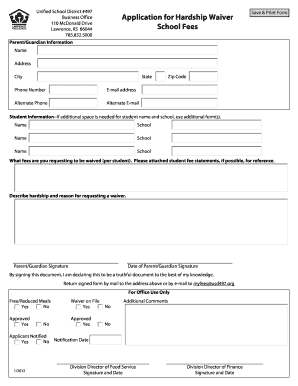
Unified School District #497 Business Office 110 McDonald Drive Lawrence, KS 66044 785.832.5000 Parent/Guardian Information Application for Hardship Waiver School Fees Save & Print Form Name Address.

How it works

  1. Open form

    Open form follow the instructions

  2. Easily sign form

    Easily sign the form with your finger

  3. Share form

    Send filled & signed form or save

How to fill out the Application For Hardship Waiver School Fees - USD 497 online

Filling out the Application For Hardship Waiver School Fees - USD 497 can be a vital step for families facing financial challenges. This guide provides clear, step-by-step instructions for completing the form online, ensuring you understand each component and its requirements.

Follow the steps to complete your application online.

  1. Press the ‘Get Form’ button to access the Application For Hardship Waiver School Fees - USD 497 and open it for editing.
  2. Fill in the parent/guardian information, including your name, address, city, state, zip code, phone number, and email address. Ensure all details are accurate to avoid delays in processing your application.
  3. Provide information about the students for whom you are requesting the waiver. Include their names and the associated schools. If you need more space, you may use additional forms.
  4. Indicate the specific fees you are requesting to be waived for each student. If possible, attach student fee statements for reference to facilitate the review process.
  5. Describe the hardship you are experiencing and explain the reasons for requesting a waiver. Be concise but comprehensive in articulating your situation.
  6. Sign and date the form, affirming that the information provided is truthful to the best of your knowledge. This step is crucial for the validity of your application.
  7. Return the signed form either by mailing it to the address provided at the top or by emailing it to myfees@usd497.org. Ensure you keep a copy for your records.
  8. After submission, monitor for feedback regarding your application. Notifications will be sent out indicating the status of your request.

Complete your application online today to ensure your request for a hardship waiver is processed efficiently.

Get form

Experience a faster way to fill out and sign forms on the web. Access the most extensive library of templates available.
Get form

Related content

2010 - Blue Ribbon Schools Program - US Department...
Web site/URL: www.usd497.org E-mail: jfridell@usd497.org. I have reviewed the information...
Learn more
Jayhawk Blueprint Concurrent Enrollment Program...
bduncan@usd497.org ... Students from the Lawrence Public School District must be an...
Learn more
Topeka, Kansas - Wikipedia
Topeka is the capital city of the U.S. state of Kansas and the seat of Shawnee County. It...
Learn more

Related links form

Central Laborers Pension Fund Direct Deposit Form Ldb Online Form Application California State Teachers Retirement System Direct Deposit Form Hastings Direct Policy Booklet

Questions & Answers

Get answers to your most pressing questions about US Legal Forms API.

Contact support

An index is a list of all the names, subjects and ideas in a piece of written work, designed to help readers quickly find where they are discussed in the text.

Mark the entries Select the text you'd like to use as an index entry, or just click where you want to insert the entry. On the References tab, in the Index group, click Mark Entry. You can edit the text in the Mark Index Entry dialog box. ... Click Mark to mark the index entry.

In personal names, a title before a name (Dr., Mr., Mrs.), a seniority suffix (II, III, Jr., Sr.) , or a professional suffix (Mayor, MD, Senator) after a name is the last indexing unit. Numeric suffixes (II,III) are filed before alphabetic suffixes (Jr., Senator, Sr.).

In information retrieval, an index term (also known as subject term, subject heading, descriptor, or keyword) is a term that captures the essence of the topic of a document.

Get This Form Now!

Use professional pre-built templates to fill in and sign documents online faster. Get access to thousands of forms.
Get form
If you believe that this page should be taken down, please follow our DMCA take down processhere.

Industry-leading security and compliance

US Legal Forms protects your data by complying with industry-specific security standards.
  • In businnes since 1997
    25+ years providing professional legal documents.
  • Accredited business
    Guarantees that a business meets BBB accreditation standards in the US and Canada.
  • Secured by Braintree
    Validated Level 1 PCI DSS compliant payment gateway that accepts most major credit and debit card brands from across the globe.
Get Application For Hardship Waiver School Fees - USD 497 - Usd497
Get form
Form Packages
Adoption
Bankruptcy
Contractors
Divorce
Home Sales
Employment
Identity Theft
Incorporation
Landlord Tenant
Living Trust
Name Change
Personal Planning
Small Business
Wills & Estates
Packages A-Z
Form Categories
Affidavits
Bankruptcy
Bill of Sale
Corporate - LLC
Divorce
Employment
Identity Theft
Internet Technology
Landlord Tenant
Living Wills
Name Change
Power of Attorney
Real Estate
Small Estates
Wills
All Forms
Forms A-Z
Form Library
Customer Service
Terms of Service
Privacy Notice
Legal Hub
Content Takedown Policy
Bug Bounty Program
About Us
Help Portal
Legal Resources
Blog
Affiliates
Contact Us
Delete My Account
Site Map
Industries
Forms in Spanish
Localized Forms
State-specific Forms
Forms Kit
Legal Guides
Real Estate Handbook
All Guides
Prepared for You
Notarize
Incorporation services
Our Customers
For Consumers
For Small Business
For Attorneys
Our Sites
US Legal Forms
USLegal
FormsPass
pdfFiller
signNow
airSlate WorkFlow
DocHub
Instapage
Social Media
Call us now toll free:
+1 833 426 79 33
As seen in:
  • USA Today logo picture
  • CBC News logo picture
  • LA Times logo picture
  • The Washington Post logo picture
  • AP logo picture
  • Forbes logo picture
© Copyright 1997-2025
airSlate Legal Forms, Inc.
3720 Flowood Dr, Flowood, Mississippi 39232
Form Packages
Adoption
Bankruptcy
Contractors
Divorce
Home Sales
Employment
Identity Theft
Incorporation
Landlord Tenant
Living Trust
Name Change
Personal Planning
Small Business
Wills & Estates
Packages A-Z
Form Categories
Affidavits
Bankruptcy
Bill of Sale
Corporate - LLC
Divorce
Employment
Identity Theft
Internet Technology
Landlord Tenant
Living Wills
Name Change
Power of Attorney
Real Estate
Small Estates
Wills
All Forms
Forms A-Z
Form Library
Customer Service
Terms of Service
Privacy Notice
Legal Hub
Content Takedown Policy
Bug Bounty Program
About Us
Help Portal
Legal Resources
Blog
Affiliates
Contact Us
Delete My Account
Site Map
Industries
Forms in Spanish
Localized Forms
State-specific Forms
Forms Kit
Legal Guides
Real Estate Handbook
All Guides
Prepared for You
Notarize
Incorporation services
Our Customers
For Consumers
For Small Business
For Attorneys
Our Sites
US Legal Forms
USLegal
FormsPass
pdfFiller
signNow
airSlate WorkFlow
DocHub
Instapage
Social Media
Call us now toll free:
+1 833 426 79 33
As seen in:
  • USA Today logo picture
  • CBC News logo picture
  • LA Times logo picture
  • The Washington Post logo picture
  • AP logo picture
  • Forbes logo picture
© Copyright 1997-2025
airSlate Legal Forms, Inc.
3720 Flowood Dr, Flowood, Mississippi 39232