Loading
Form preview
  • US Legal Forms
  • Other Templates
  • More Forms
  • More Uncategorized Forms
  • What Is Payment Type In Vat 317 Form

Get What Is Payment Type In Vat 317 Form

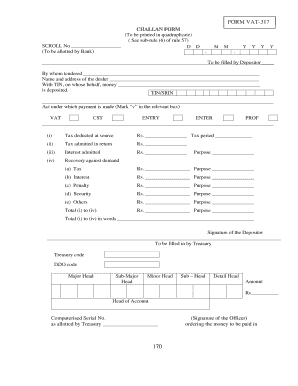
Itor By whom tendered Name and address of the dealer With TIN, on whose behalf, money is deposited. TIN/SRIN Act under which payment is made (Mark v in the relevant box) VAT CST ENTRY ENTER PROF.

How it works

  1. Open form

    Open form follow the instructions

  2. Easily sign form

    Easily sign the form with your finger

  3. Share form

    Send filled & signed form or save

How to fill out the What Is Payment Type In Vat 317 Form online

The What Is Payment Type In Vat 317 Form is essential for documenting various payment types under VAT regulations. This guide will help you navigate the form by providing simple, step-by-step instructions to complete it accurately online.

Follow the steps to seamlessly complete the form online.

  1. Click ‘Get Form’ button to obtain the form and open it in the editor.
  2. In the section for the depositor, fill in your name and address. Ensure that all details are accurate to avoid any processing issues.
  3. Provide the Tax Identification Number (TIN) or State Registration Identification Number (SRIN) of the dealer for whom the payment is being made.
  4. Mark the appropriate box under 'Act under which payment is made', selecting from VAT, CST, Entry, ENTER, or PROF.
  5. Complete the tax-related fields, including: 1) Tax deducted at source, 2) Tax admitted in return, 3) Interest admitted, and 4) Recovery against demand. Enter the amounts for each as applicable.
  6. Under recovery against demand, specify the purpose of the payment, such as tax, interest, penalty, security, or others, along with the corresponding amounts.
  7. Calculate the total amount from steps (i) to (iv) and input it in the designated area. Write the total in words as well for clarity.
  8. Sign in the signature field to validate the form. Ensure the signature matches your identification.
  9. Once all fields are completed, you can save changes, download, print, or share the filled-out form as necessary.

Complete your documents online and ensure compliance with ease.

Get form

Experience a faster way to fill out and sign forms on the web. Access the most extensive library of templates available.
Get form

Related content

DOR: Contact Phone Numbers by Tax Type - IN.gov
Tax Clearances - Worker's Compensation, Payment Services, 317-232-5977. Tax Forms Order...
Learn more
[PDF] Advantages of the Credit-Invoice Method for...
relevant tax rate and subtracting VAT paid on inputs from the tenta- ... 317. Michael...
Learn more
List of legal entity types by country - Wikipedia
A business entity is an entity that is formed and administered as per corporate law in...
Learn more

Related links form

Patient Referral Form Call 1300 899 850 To Make An Appointment Dr ... Amarillo Endoscopy Specialists SUBPOENA SUMMIT COUNTY DOMESTIC RELATIONS COURT Favn Report Form

Questions & Answers

Get answers to your most pressing questions about US Legal Forms API.

Contact support

An index signature parameter type cannot be a literal type or generic type. Consider using a mapped object type instead. We can deal with the above issue by creating multiple index signatures or using the in keyword.

The name of the index signature, for example, index in { [index:string]: { message:string}} For example, if it's usernames, you may do { [username:string]: {message:string}} to assist the next developer who will look at the code (which just might happen to be you).

The idea of the index signatures is to type objects of unknown structure when you only know the key and value types. An index signature fits the case of the salary parameter: the function should accept salary objects of different structures — just make sure that object values are numbers.

The index signature can be used to define the type of object whose values are of consistent kinds or whose structure you do not know. The index signature is made up of the index name and types enclosed in square brackets and then followed by a colon and the value type: {[indexName: KeyType]: ValueType}.

The error "Property is incompatible with index signature" occurs when a property is not compatible with the specified type of the index signature. To solve the error, change the type of the property or use a union to update the type in the index signature.

Index Signatures This index signature states that when a StringArray is indexed with a number , it will return a string . Only some types are allowed for index signature properties: string , number , symbol , template string patterns, and union types consisting only of these.

# Index Signature A type in TypeScript usually describes an exact set of fields to match on an object. An index signature is a way to define the Shape of fields which are not known ahead of time.

Get This Form Now!

Use professional pre-built templates to fill in and sign documents online faster. Get access to thousands of forms.
Get form
If you believe that this page should be taken down, please follow our DMCA take down processhere.
Get What Is Payment Type In Vat 317 Form
Get form
  • Adoption
  • Bankruptcy
  • Contractors
  • Divorce
  • Home Sales
  • Employment
  • Identity Theft
  • Incorporation
  • Landlord Tenant
  • Living Trust
  • Name Change
  • Personal Planning
  • Small Business
  • Wills & Estates
  • Packages A-Z
  • Affidavits
  • Bankruptcy
  • Bill of Sale
  • Corporate - LLC
  • Divorce
  • Employment
  • Identity Theft
  • Internet Technology
  • Landlord Tenant
  • Living Wills
  • Name Change
  • Power of Attorney
  • Real Estate
  • Small Estates
  • Wills
  • All Forms
  • Forms A-Z
  • Other Templates
  • Legal Hub
  • About Us
  • Help Portal
  • Legal Resources
  • Blog
  • Affiliates
  • Contact Us
  • Delete My Account
  • Site Map
  • Industries
  • Forms in Spanish
  • Localized Forms
  • State-specific Forms
  • Forms Kit
  • Real Estate Handbook
  • All Guides
  • Notarize
  • Incorporation services
  • For Consumers
  • For Small Business
  • For Attorneys
  • USLegal
  • FormsPass
  • pdfFiller
  • signNow
  • altaFlow
  • DocHub
  • Instapage
Form Packages
  • Adoption
  • Bankruptcy
  • Contractors
  • Divorce
  • Home Sales
  • Employment
  • Identity Theft
  • Incorporation
  • Landlord Tenant
  • Living Trust
  • Name Change
  • Personal Planning
  • Small Business
  • Wills & Estates
  • Packages A-Z
Form Categories
  • Affidavits
  • Bankruptcy
  • Bill of Sale
  • Corporate - LLC
  • Divorce
  • Employment
  • Identity Theft
  • Internet Technology
  • Landlord Tenant
  • Living Wills
  • Name Change
  • Power of Attorney
  • Real Estate
  • Small Estates
  • Wills
  • All Forms
  • Forms A-Z
  • Other Templates
Customer Service
  • Legal Hub
  • About Us
  • Help Portal
  • Legal Resources
  • Blog
  • Affiliates
  • Contact Us
  • Delete My Account
  • Site Map
  • Industries
  • Forms in Spanish
  • Localized Forms
  • State-specific Forms
  • Forms Kit
Legal Guides
  • Real Estate Handbook
  • All Guides
Prepared for you
  • Notarize
  • Incorporation services
Our Customers
  • For Consumers
  • For Small Business
  • For Attorneys
Our Sites
  • USLegal
  • FormsPass
  • pdfFiller
  • signNow
  • altaFlow
  • DocHub
  • Instapage
Social Media
Call us now toll free:
+1 833 426 79 33
As seen in:
© Copyright 1999-2026 airSlate Legal Forms, Inc. 17 Station Street, Suite 303, Brookline, MA 02445
  • Your Privacy Choices
  • Terms of Service
  • Privacy Notice
  • Content Takedown Policy
  • Bug Bounty Program