Loading
Get Worker Wage Rate Form - The Texas A&m University System - Tamus
How it works
-

Open form follow the instructions
-

Easily sign the form with your finger
-

Send filled & signed form or save
How to fill out the Worker Wage Rate Form - The Texas A&M University System - Tamus online
Filling out the Worker Wage Rate Form is essential for contractors working on projects within The Texas A&M University System. This guide will assist you in completing the form accurately to ensure compliance with prevailing wage guidelines.
Follow the steps to successfully fill out the Worker Wage Rate Form.
- Click ‘Get Form’ button to obtain the form and access it in your preferred editing tool.
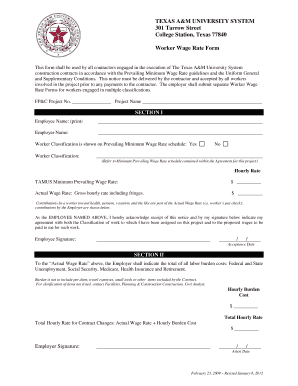
- In Section I, enter the employee's name and employer name in the designated fields. Make sure that these names are printed clearly.
- Indicate the worker classification by checking the applicable box with respect to the Prevailing Minimum Wage Rate schedule. If classified, provide the title of the worker classification.
- Enter the TAMUS Minimum Prevailing Wage Rate and the actual wage rate in the specified fields. Ensure that the actual wage rate includes all gross hourly amounts, including any fringe benefits.
- The employee must sign and date the acknowledgement statement confirming receipt of the notice and agreement with their assigned classification and proposed wages.
- In Section II, calculate and enter the total labor burden costs including Federal and State Unemployment, Social Security, Medicare, Health Insurance, and Retirement. Exclude any per diem, travel expenses, or items not included by the contract.
- Calculate the total hourly rate by adding the actual wage rate to the hourly burden cost. Write this amount in the designated area.
- The employer must complete the signature and date fields to attests to the accuracy of the information provided.
- After completing all sections, ensure to save changes made to the document. You can download, print, or share the completed form as needed.
Complete your Worker Wage Rate Form online today to ensure compliance with wage regulations.
States with the highest and lowest minimum wage California will have the highest minimum wage in 2023, at 15.50 dollars.
Industry-leading security and compliance
US Legal Forms protects your data by complying with industry-specific security standards.
-
In businnes since 199725+ years providing professional legal documents.
-
Accredited businessGuarantees that a business meets BBB accreditation standards in the US and Canada.
-
Secured by BraintreeValidated Level 1 PCI DSS compliant payment gateway that accepts most major credit and debit card brands from across the globe.