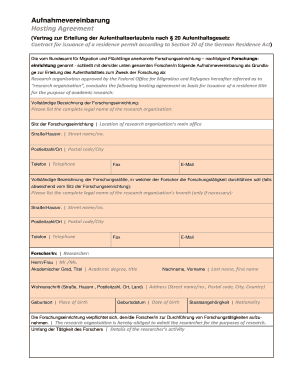
Aufnahmevereinbarung Hosting Agreement (Vertrag zur Erteilung der Aufenthaltserlaubnis nach 20 Aufenthaltsgesetz Contract for issuance of a residence permit according to Section 20 of the German Residence.

How it works
  • Open form

    Open form follow the instructions

  • Easily sign form

    Easily sign the form with your finger

  • Share form

    Send filled & signed form or save

How to fill out the Aufnahmevereinbarung online

The Aufnahmevereinbarung is a crucial document for obtaining a residence permit for research purposes in Germany. This guide provides clear, step-by-step instructions to assist users in navigating the online filling process effectively.

Follow the steps to complete the Aufnahmevereinbarung online.

  1. Click the ‘Get Form’ button to access the form and open it in the editor for online completion.
  2. Begin by entering the complete legal name of the research organisation in the designated field, ensuring accuracy.
  3. Provide the location of the research organisation's main office, including street name, house number, postal code, and city.
  4. Fill in the contact information for the organisation, including telephone number, fax number, and email address.
  5. If applicable, enter the name of the branch where the research will take place, along with its address and contact details.
  6. In the section for the researcher, indicate their title and full name, followed by the complete residential address.
  7. Provide the researcher’s place of birth and date of birth, ensuring that the information is accurate.
  8. Specify the nationality of the researcher in the relevant field.
  9. Confirm the organisation's commitment to admitting the researcher for their research activities.
  10. Outline the details of the researcher's activity as required.
  11. Select the type of legal relationship that will be established—employment, scholarship, or other—based on the researcher's status.
  12. Complete the financial information section by entering the monthly gross pay, award, or other income available to support the researcher.
  13. Provide evidence of additional means of subsistence if applicable, along with the corresponding amount.
  14. Indicate the duration of the research project by filling in the start and end dates.
  15. Complete the final acknowledgment by signing the document electronically on behalf of the research organisation and the researcher.
  16. Once all fields are filled, save your changes, and choose to download, print, or share the completed form as needed.

Complete your Aufnahmevereinbarung online today to begin your research journey in Germany.

Get form

Experience a faster way to fill out and sign forms on the web. Access the most extensive library of templates available.

Related content

Künstler-produzenten-vertrag — Organic Farming...

Jul 22, 2020 — ... veröffentlicht er den Master im Rahmen einer Aufnahmevereinbarung...

Learn more
Bertis Downs IV - qaz.wiki - QWERTY.WIKI

... zu Urheberrechts- und Markenproblemen zu stellen, als sie zum ersten Mal eine...

Learn more
Questions & Answers

Get answers to your most pressing questions about US Legal Forms API.

Contact support

How do you implement a page break?

Insert a page break Put your cursor where you want one page to end and the next to begin. Go to Insert > Page Break.

Use page breaks to control where a page ends and where a new page begins. Place the cursor where you want to start a new page. Select Insert > Page Break.

A page break is a special marker that will end the current page and start a new one. Click to place your cursor where you want to start a new page.

0:02 1:30 Lesson 18 - Inserting Page Breaks And Keeping Paragraph Continuity YouTube Start of suggested clip End of suggested clip You. Know what happened here is you know we're typing all this information. And we get to the bottomMoreYou. Know what happened here is you know we're typing all this information. And we get to the bottom. And because word is trying to maintain the one-inch margins in this document. This sentence.

A page break is inserted, and any text after that point is moved to a new page. You can also insert a page break by pressing Ctrl + Enter. If you'd rather insert an entire blank page at the break, select Blank Page in the Pages group.

Put your cursor where you want one page to end and the next to begin. Go to Insert > Page Break.

Page breaks are used to end a page without filling it with text. To make sure the title page of your thesis/dissertation is separate from the signature page, for example, insert a page break after the graduation date on the title page.

If you don't see Page Break, your document is a page layout document and doesn't use page breaks. Instead, you can add a new page.

Get This Form Now!

Use professional pre-built templates to fill in and sign documents online faster. Get access to thousands of forms.

If you believe that this page should be taken down, please follow our DMCA take down process here.

Get Aufnahmevereinbarung