Loading
Get Application Form - Swinburne University Of Technology - Swinburne Edu
How it works
-

Open form follow the instructions
-

Easily sign the form with your finger
-

Send filled & signed form or save
How to fill out the Application Form - Swinburne University Of Technology - Swinburne Edu online
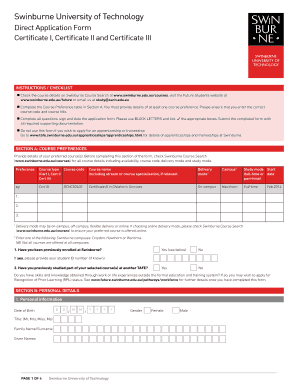
This guide provides clear, step-by-step instructions on how to complete the Application Form for Swinburne University of Technology. Designed for ease of use, it aims to help users accurately fill out each section of the form online.
Follow the steps to successfully complete your application.
- Click ‘Get Form’ button to obtain the form and open it in the editor.
- Begin by completing the Course Preference table in Section A. It is essential to provide details of at least one course preference by entering the correct course code and title. Make sure to verify the course details through Swinburne Course Search prior to filling out this section.
- In Section B, enter your personal details. Fill in your date of birth, name (using BLOCK LETTERS), gender, contact information, postal address, and home address. If your home address is the same as your postal address, you can indicate that by ticking the appropriate box.
- Indicate your citizenship status in Section B. Select the applicable option and provide relevant details such as visa subclass number if applicable. Be mindful to complete this section accurately as it determines your eligibility.
- In the disability section, if applicable, select any relevant options to describe your situation. It is important to acknowledge that this information will assist the university in providing necessary support services.
- Proceed to Section C, Previous Study, and provide details about your secondary and post-secondary education. Accurate completion of this section is vital as it reflects your educational background.
- In Section D, Employment History, include details of your employment experiences. If more space is required, feel free to attach additional sheets with the necessary information.
- Complete Section E, Applicant’s Declaration, by signing and dating the application form. Ensure that the information provided is truthful and complete, as any discrepancies could affect your application status.
- After filling out the application form, save your changes. You can download, print, or share the form as needed before submitting it via email, post, or in person, as indicated in the submission instructions.
Submit your application form online today to take the next step in your educational journey!
To apply online, you will need these supporting documents Certified copies of your previous academic results. Certified English language proficiency test results (IELTS, PTE or TOEFL). Letters from your school or employer.
Industry-leading security and compliance
US Legal Forms protects your data by complying with industry-specific security standards.
-
In businnes since 199725+ years providing professional legal documents.
-
Accredited businessGuarantees that a business meets BBB accreditation standards in the US and Canada.
-
Secured by BraintreeValidated Level 1 PCI DSS compliant payment gateway that accepts most major credit and debit card brands from across the globe.