Loading
Get Stock Donation Information - Diocese Of Arlington
How it works
-

Open form follow the instructions
-

Easily sign the form with your finger
-

Send filled & signed form or save
How to fill out the Stock Donation Information - Diocese Of Arlington online
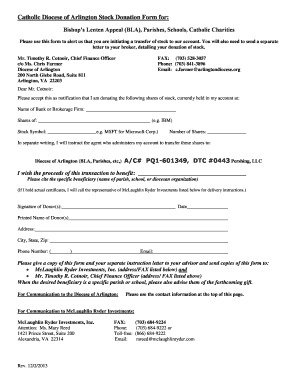
Filling out the Stock Donation Information form for the Diocese Of Arlington is a straightforward process that allows you to contribute to various causes, such as the Bishop’s Lenten Appeal or local parishes. This guide will walk you through each step of the form to ensure that your donation is processed smoothly.
Follow the steps to successfully complete your stock donation form.
- Click the ‘Get Form’ button to access the Stock Donation Information form and open it in your editor of choice.
- Begin by completing your contact information at the top of the form. This includes your name, address, city, state, zip code, phone number, and email. Accurate information is essential for any necessary follow-up.
- In the designated section, provide the name of the bank or brokerage firm where your stock is currently held. This identifies the source of your shares.
- Fill in the name of the stock you are donating (e.g., IBM) and its stock symbol (e.g., MSFT for Microsoft Corp.). This information is crucial for identifying the exact shares being donated.
- Indicate the number of shares you wish to donate. Ensure this number reflects your intended contribution.
- Specify the beneficiary of your donation. This could be the Diocese of Arlington's various causes such as parishes, schools, or charitable organizations. Be specific about the beneficiary's name.
- Provide your signature and include the date you are submitting the form. This serves as your authorization for the donation.
- Make a copy of the completed form along with your separate letter of instruction to your broker. Ensure that these copies are shared with your financial advisor and the necessary parties at McLaughlin Ryder Investments and the Diocese of Arlington.
- After reviewing your information for accuracy, save the changes, and consider downloading or printing a copy for your records. You may also opt to share the form directly with relevant parties.
Take the next step in supporting your chosen cause by completing your Stock Donation Information form online today.
Report the stock donation when you file your taxes. When you file your federal taxes, you must report your stock donation on IRS Form 8283, which is the form for non-cash charitable contributions. You'll file this form with your tax return for the year you donated the stock.
Industry-leading security and compliance
US Legal Forms protects your data by complying with industry-specific security standards.
-
In businnes since 199725+ years providing professional legal documents.
-
Accredited businessGuarantees that a business meets BBB accreditation standards in the US and Canada.
-
Secured by BraintreeValidated Level 1 PCI DSS compliant payment gateway that accepts most major credit and debit card brands from across the globe.