Loading
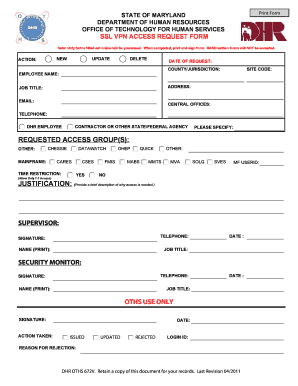
Get Mmtslogin Form
How it works
-

Open form follow the instructions
-

Easily sign the form with your finger
-

Send filled & signed form or save
How to fill out the Mmtslogin Form online
The Mmtslogin Form is a vital document for requesting access to various databases and systems within the Maryland Department of Human Resources. This guide will provide you with clear and detailed steps to successfully complete the form online, ensuring your request is processed without any issues.
Follow the steps to complete the Mmtslogin Form online
- Press the ‘Get Form’ button to obtain the Mmtslogin Form and open it in your editing platform.
- Select the appropriate action for your request: NEW, UPDATE, or DELETE.
- Enter the date of your request in the designated field.
- Fill in the county or jurisdiction where you are employed.
- Provide your full name as the employee.
- Input your site code in the relevant section.
- Fill out your complete address.
- Specify your job title as it appears on your employment records.
- Enter your email address for communications.
- Indicate your central offices if applicable.
- Provide your telephone number.
- Indicate whether you are a DHR employee, contractor, or from another state/federal agency, and specify if needed.
- Select the requested access group(s) by checking the appropriate boxes.
- Indicate any time restrictions for access, specifically if you require 7-7 access.
- Provide your MF User ID if applicable.
- In the justification field, briefly explain why the access is necessary.
- Enter your supervisor's information, including their telephone number.
- Sign and print your name in the signature section, along with the date.
- Your supervisor should also sign, print their name, and date the form.
- If applicable, the security monitor must complete their section with appropriate details.
- Finalize by saving your changes; print and sign the form. Note that hand-written forms will not be accepted.
- Submit the completed form as directed, ensuring you have retained a copy for your records.
Complete your Mmtslogin Form online today to ensure your access request is processed efficiently.
The biggest difference between footnotes and parenthetical citations is that brief information about the source isn't found directly after the borrowed text or paraphrase. Instead, a small bit of information, which includes the last name of the author and the page number, is found at the bottom of the page.