Loading
Get Data Entry Form For Cases Of Civil Nature - Directorate Of Archaeology ... - Archaeology Up Nic
How it works
-

Open form follow the instructions
-

Easily sign the form with your finger
-

Send filled & signed form or save
How to fill out the Data Entry Form For Cases Of Civil Nature - Directorate Of Archaeology online
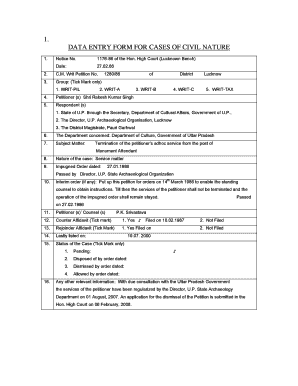
Filling out the Data Entry Form for cases of civil nature can be a straightforward process with the right guidance. This form is specifically designed for cases involving the Directorate of Archaeology and requires detailed information to ensure proper case management.
Follow the steps to effectively complete the form.
- Click the ‘Get Form’ button to access the Data Entry Form. This will open the form in your preferred document editor, allowing you to begin.
- Enter the notice number at the top of the form. This is essential as it helps identify the specific case you are handling.
- Fill in the date when the case was initiated. Make sure this date aligns with your records.
- Indicate the C.M. Writ Petition number associated with your case. This is crucial for tracking and referencing your case in legal communications.
- Select the group that corresponds to your case by marking the respective option. Options may include WRIT-PIL, WRIT-A, WRIT-B, WRIT-C, and WRIT-TAX.
- Provide the names of the petitioners. Ensure accuracy in spelling, as this will be reflected in legal documents.
- List the respondents who are parties to the case, including any relevant governmental departments or individuals.
- Specify the concerned department within the Uttar Pradesh government that is pertinent to your case. This helps direct the document to the right authority.
- Describe the subject matter of the case clearly and concisely. This section should summarize the main issues at stake.
- Indicate the nature of the case as a service matter or other classifications as applicable.
- Document any impugned orders that are relevant to the petition. Include dates and any specific actions taken.
- If there are interim orders in place, enter this information clearly, including relevant dates and instructions.
- Fill in details about the petitioner's counsel if applicable. This helps establish representation in the case.
- Indicate if a counter affidavit has been filed and provide the relevant dates.
- Mark if a rejoinder affidavit has been filed, along with this information.
- Lastly, record the current status of the case by ticking the appropriate option, such as Pending, Disposed of, Dismissed, or Allowed.
- Include any other relevant information that might assist in understanding the context of the case.
- Review all entered information for accuracy and completeness before proceeding to save changes, download, print, or share the completed form.
Ensure your case documentation is complete by filling out the Data Entry Form online today.
Each affidavit must contain the full name and address of the person making the affidavit; date and place of birth of the person making the affidavit; and complete information and details explaining how the person acquired their knowledge of your marriage; and.
Industry-leading security and compliance
US Legal Forms protects your data by complying with industry-specific security standards.
-
In businnes since 199725+ years providing professional legal documents.
-
Accredited businessGuarantees that a business meets BBB accreditation standards in the US and Canada.
-
Secured by BraintreeValidated Level 1 PCI DSS compliant payment gateway that accepts most major credit and debit card brands from across the globe.