Loading
Get Global Stock Plan Services Letter Of Authorization ... - Morgan Stanley
How it works
-

Open form follow the instructions
-

Easily sign the form with your finger
-

Send filled & signed form or save
How to fill out the Global Stock Plan Services Letter Of Authorization - Morgan Stanley online
Completing the Global Stock Plan Services Letter Of Authorization from Morgan Stanley is a straightforward process if you follow the outlined steps carefully. This guide will help you fill out the necessary fields and ensure your information is submitted correctly.
Follow the steps to fill out the form effectively.
- Click the ‘Get Form’ button to access the form and open it for completion.
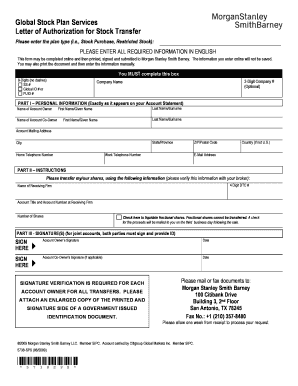
- Enter the type of plan you are participating in, such as Stock Purchase or Restricted Stock. Ensure clarity and accuracy as this will impact the processing of your request.
- Complete all required fields in English. Note that this form cannot save your entries once completed online.
- Fill in your 9-digit identification number by selecting from one of the following options: Social Security Number, Global ID, or Personal User Identification.
- Provide the name of the company associated with your account, and if applicable, input the 3-digit company number.
- In Part I, enter your personal information exactly as it appears on your account statement, including names, mailing address, and telephone numbers.
- In Part II, specify the receiving firm for the share transfer by entering the 4-digit DTC number, the account title, account number, and the number of shares to be transferred.
- If applicable, check the box to liquidate any fractional shares, noting that a check for the proceeds will be mailed to you following the sale.
- For Part III, both the account owner and the co-owner (if applicable) must sign and date the form. Ensure that all signatures match the identification documents provided.
- Attach an enlarged copy of a government-issued identification document that shows your printed name and signature, ensuring clarity for verification.
- Submit the completed form and the identification copy by either mailing or faxing it to the address provided on the form. Be mindful of submission deadlines if related to a trade.
- Once you've completed all steps, you may save changes, download, print, or share the form as needed.
Begin your document preparation by filling out the Global Stock Plan Services Letter Of Authorization online.
Select which shares are sold using Lot Selection. Either choose for shares to be sold starting with the Earliest Acquisition First or define which shares you would like to sell by Acquisition Date. Then select either the Number of Shares you wish to sell or Sell 100% and Continue.
Industry-leading security and compliance
US Legal Forms protects your data by complying with industry-specific security standards.
-
In businnes since 199725+ years providing professional legal documents.
-
Accredited businessGuarantees that a business meets BBB accreditation standards in the US and Canada.
-
Secured by BraintreeValidated Level 1 PCI DSS compliant payment gateway that accepts most major credit and debit card brands from across the globe.