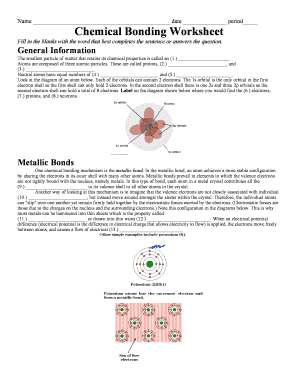
Name date period Chemical Bonding Worksheet Fill in the blanks with the word that best completes the sentence or answers the question. General Information The smallest particle of matter that retains.

How it works
  • Open form

    Open form follow the instructions

  • Easily sign form

    Easily sign the form with your finger

  • Share form

    Send filled & signed form or save

How to use or fill out the Chemical Bonding Worksheet Fill In The Blanks online

Completing the Chemical Bonding Worksheet Fill In The Blanks online is a straightforward process. This guide will assist you in systematically filling out each section of the worksheet, ensuring you provide accurate and complete answers.

Follow the steps to successfully complete the Chemical Bonding Worksheet online.

  1. Click ‘Get Form’ button to access the Chemical Bonding Worksheet and open it in your preferred online editor.
  2. Begin with the ‘Name’ field. Enter your full name as it is required for identification.
  3. Next, fill in the ‘Date’ field. Enter the current date in the specified format.
  4. Proceed to the ‘Period’ field. Indicate the class period in which you are completing the worksheet.
  5. Start filling in the blanks in the ‘General Information’ section. Read each sentence carefully and enter the correct word that completes the statement.
  6. Continue to the ‘Metallic Bonds’ section. Again, read the provided information and fill in the blanks with the appropriate terms.
  7. Move on to the ‘Covalent Bonds vs Ionic Bonds’ section. Carefully consider the prompt and provide the correct responses in the designated blanks.
  8. As you complete each section, ensure to double-check your answers for accuracy and completeness.
  9. Once you have filled out all the sections, you may save your changes or download the document as needed. You can print or share the completed worksheet as per your requirements.

Complete your Chemical Bonding Worksheet online today for a seamless learning experience!

Get form

Experience a faster way to fill out and sign forms on the web. Access the most extensive library of templates available.

Related content

Teaching Chemical Bonding - ERIC - US Department...

Bonding. Complete the worksheet by filling in the blank spaces. 1. Metals have one, two or...

Learn more
Chapter 8 - Chemical Bonds - CHE 105/110...

Nov 18, 2020 — Bonds. Chemical bonds. In a perfect diamond crystal, each C atom ... For...

Learn more
MATH 2223 Finite Mathematics - Arkansas Tech...

Aug 10, 2012 — Answer Key. 236. Index ... You invested a total of $38,000 in two...

Learn more
Questions & Answers

Get answers to your most pressing questions about US Legal Forms API.

Contact support

What is a watermark example?

To keep it simple, a watermark is a small message, for instance, your logo, superimposed onto the image or PDF document to show who it belongs to (i.e. your brand). It is placed in such a way that the image isn't affected by its presence, for example, in the bottom corner.

The term watermark comes from the way these designs are created, during the "wet paper" stage of making paper, and also from the fact that a watermark resembles a damp spot. Documents, stamps, and paper money all have watermarks that label them as genuine. Fancy writing paper often includes watermarks noting the brand.

Watermarking is the process of superimposing a logo or piece of text atop a document or image file, and it's an important process when it comes to both the copyright protection and marketing of digital works.

Obvious examples of watermarks include shaded text phrases like “Top Secret”, “Confidential”, and “Internal Use Only”. A watermark saying “Test” is one that is often overlooked. Yet it can be very useful in safeguarding information in perhaps a different way.

an image behind the main text of a computer document, for example, in official company documents or in documents used when giving a talk: A watermark is more transparent than a background and is often used as a way to display company logos during a presentation.

A Branding Watermark is a YouTube feature that allows creators to add a branded image (typically a logo) to all of the videos on that channel.

Insert a watermark On the Design tab, select Watermark. Choose a pre-configured watermark, like DRAFT, CONFIDENTIAL, or DO NOT COPY. For placing a logo or image, Select Watermark > Custom Watermark > Picture watermark > Select Picture. On the same menu you can create a custom text watermark.

Add or edit a text watermark On your computer, open a document in Google Docs. Go to Insert. Watermark. In the panel on the right, click Text. Type the text you want to appear as a watermark. Optional: In the panel on the right, you can format your watermark. Click Done.

Get This Form Now!

Use professional pre-built templates to fill in and sign documents online faster. Get access to thousands of forms.

If you believe that this page should be taken down, please follow our DMCA take down process here.

Get Chemical Bonding Worksheet Fill In The Blanks