Loading
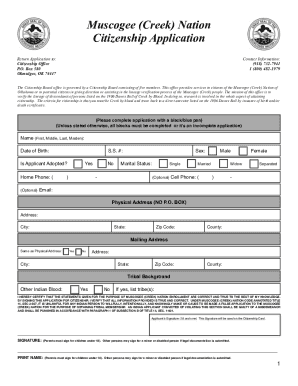
Get Citizenship Application - Muscogee (creek) Nation
How it works
-

Open form follow the instructions
-

Easily sign the form with your finger
-

Send filled & signed form or save
How to fill out the Citizenship Application - Muscogee (Creek) Nation online
This guide provides a comprehensive overview of how to successfully complete the Citizenship Application for the Muscogee (Creek) Nation. It is designed to assist users, regardless of their legal experience, in understanding and filling out each section of the application accurately.
Follow the steps to complete your application effectively.
- Click ‘Get Form’ button to obtain the form and open it in the editor.
- Begin by filling out your personal information in the relevant fields, including your full name, date of birth, and Social Security number.
- Indicate whether you are adopted by selecting 'Yes' or 'No.' If applicable, provide details regarding your marriage status.
- Fill in your physical address, ensuring it is a valid location (no P.O. Box), followed by your mailing address if it differs from your physical address.
- In the tribal background section, specify any other Indian blood you may have by selecting 'Yes' or 'No,' and if 'Yes,' list the corresponding tribes.
- Complete the ancestry information on the lineage chart by providing detailed data about your parents and grandparents, including dates of birth, dates of death, and Social Security numbers where applicable.
- Make sure to sign the application, as your signature will be used on your citizenship card. If you are under 18 years old, a parent or legal guardian must sign the application.
- Prepare all required documents including your state certified birth certificate, Social Security card, and any additional supporting documents as specified in the instructions.
- Review the entire application for completeness and accuracy, then save your changes, and prepare to download, print, or share the completed form for submission.
Complete your Citizenship Application for the Muscogee (Creek) Nation online today to ensure a seamless process.
Children 12 and younger can also get a new photo blue card but must have a parent or legal guardian present to sign the card. Upgrading to a photo ID is free. Replacement IDs are $5. For more information contact the Cherokee Nation Registration Department at 918-458-6980 or registration@cherokee.org.