Loading
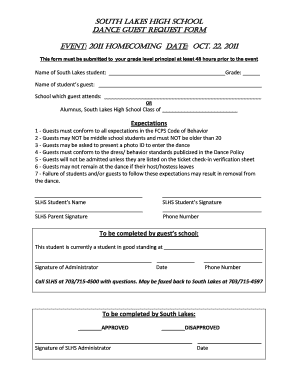
Get South Lakes High School Homecoming 2019
How it works
-

Open form follow the instructions
-

Easily sign the form with your finger
-

Send filled & signed form or save
How to fill out the South Lakes High School Homecoming 2019 online
This guide provides you with clear and concise instructions on how to effectively complete the South Lakes High School Homecoming 2019 form online. By following the outlined steps, you can ensure your submission is accurate and timely.
Follow the steps to successfully complete your request form.
- Click the ‘Get Form’ button to access the Homecoming request form and open it in the appropriate viewer.
- In the first section, enter the name of the South Lakes student who is inviting a guest. Clearly fill in the grade level next to the student's name.
- Next, provide the name of the student’s guest. Be sure to accurately input the full name to avoid any discrepancies.
- Indicate the school the guest currently attends. If the guest is an alumnus of South Lakes High School, write the class year instead.
- Review the expectations outlined on the form. Ensure that both the student and guest understand and agree to these guidelines, which include standards of behavior and identification requirements.
- Collect the necessary signatures from the South Lakes student and their parent, and input the parent's contact phone number in the designated space.
- If the guest is presently enrolled in another school, the form must be completed by an administrator from that school. This should include the administrator’s signature, the date, and a contact phone number.
- Finally, submit the completed form to the designated South Lakes administrator for approval. This should be done at least 48 hours prior to the event.
- After submission, make note of any follow-up actions necessary, including checking for approval and ensuring the guest is listed on the ticket check-in verification sheet.
Complete your South Lakes High School Homecoming 2019 document online today!
Click the name of the first contact in the list to whom you want to send the fax. Press and hold the “Ctrl” key as you click other names to add to the Message Recipients list for the fax. After you select all the recipients for the fax, click the “To->” button to add them to the Message Recipients list box.