Loading
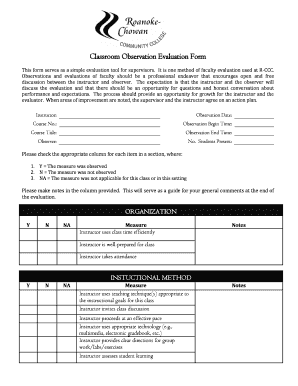
Get Classroom Observation Evaluation Form Roanoke Chowan Community College
How it works
-

Open form follow the instructions
-

Easily sign the form with your finger
-

Send filled & signed form or save
How to fill out the Classroom Observation Evaluation Form Roanoke Chowan Community College online
This guide provides step-by-step instructions for filling out the Classroom Observation Evaluation Form for Roanoke Chowan Community College. Whether you are a supervisor or an instructor, this tool is designed to support constructive evaluation and professional growth.
Follow the steps to complete the online form efficiently.
- Press the ‘Get Form’ button to access the Classroom Observation Evaluation Form and open it in your editing interface.
- Start by filling in the instructor's name, observation date, course number, course title, and the observation times (begin and end). This information is critical for identifying the context of the evaluation.
- Complete the observer's name and the number of students present during the observation. Accurate records are essential for thorough evaluations.
- For each item in the Organization section, select the appropriate column (Y, N, NA) based on your observations and provide notes in the designated column to elaborate on each measure.
- Proceed to the Instructional Method section and again check the appropriate column for each item, along with related notes that reflect your observations.
- Continue with the Content or Subject Knowledge section, using the same approach of selecting columns and making notes.
- In the Student Interaction section, assess how the instructor engages with the students, selecting from the options and noting your observations.
- Follow with the Communication section, evaluating the instructor’s communication style and efficacy as you did in previous sections.
- In the Instructional Resources section, briefly assess classroom materials and conditions, noting whether they met expectations.
- At the end of the form, address the General section by summarizing areas of strength and professional development collaboratively with the instructor.
- Complete the Observer's Name and Signature, as well as the Instructor's Name and Signature after the post-observation discussion. Remember that signing does not imply agreement with the comments, only receipt of the evaluation.
- Finally, save your changes, download the completed form, print it if necessary, or share it as required.
Take the next step in enhancing your evaluation process by completing the Classroom Observation Evaluation Form online.
3 Backlogs Exemption Certificate For AP Students.
Industry-leading security and compliance
US Legal Forms protects your data by complying with industry-specific security standards.
-
In businnes since 199725+ years providing professional legal documents.
-
Accredited businessGuarantees that a business meets BBB accreditation standards in the US and Canada.
-
Secured by BraintreeValidated Level 1 PCI DSS compliant payment gateway that accepts most major credit and debit card brands from across the globe.