Loading
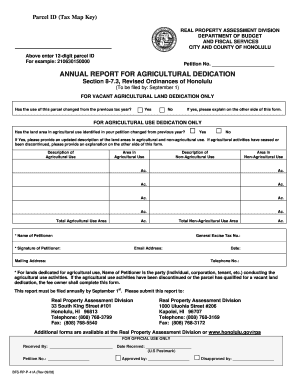
Get Annual Report For Agricultural Dedication Section 8-73
How it works
-

Open form follow the instructions
-

Easily sign the form with your finger
-

Send filled & signed form or save
How to fill out the ANNUAL REPORT FOR AGRICULTURAL DEDICATION Section 8-73 online
This guide provides step-by-step instructions for completing the ANNUAL REPORT FOR AGRICULTURAL DEDICATION Section 8-73 online. By following these guidelines, users can ensure accurate and timely submission of their annual report.
Follow the steps to successfully complete your form online.
- Click ‘Get Form’ button to obtain the form and open it in the editor.
- Enter the 12-digit parcel ID in the designated field, ensuring that the number is accurate to avoid any processing issues.
- If applicable, indicate whether the use of the parcel has changed from the previous tax year by selecting 'Yes' or 'No'. If you select 'Yes', provide a detailed explanation on the reverse side of the form.
- For users with agricultural use dedication, state if the land area in agricultural use has changed from the previous year. Select 'Yes' or 'No' and, if 'Yes', update the description of both agricultural and non-agricultural use areas.
- Provide specific details in the fields related to the description of agricultural use and the area in agricultural use, making sure to calculate the total agricultural use area.
- For non-agricultural use, complete the description field and input the area size. Ensure to compute the total for non-agricultural use area as well.
- Fill in the petitioner’s name, general excise tax number, and signature. Enter the email address, mailing address, date, and telephone number.
- Review all the filled sections for accuracy to ensure a smooth submission process.
- After confirming all information is correct, save changes, and utilize the options available to download, print, or share the completed form.
Complete your ANNUAL REPORT FOR AGRICULTURAL DEDICATION online today to ensure compliance and avoid delays.
The correct answer is Text. The Text group has the header and footer function in slides of MS PowerPoint. The header is a section of the document that appears in the top margin, while the footer is a section of the document that appears in the bottom margin.
Industry-leading security and compliance
US Legal Forms protects your data by complying with industry-specific security standards.
-
In businnes since 199725+ years providing professional legal documents.
-
Accredited businessGuarantees that a business meets BBB accreditation standards in the US and Canada.
-
Secured by BraintreeValidated Level 1 PCI DSS compliant payment gateway that accepts most major credit and debit card brands from across the globe.