Loading
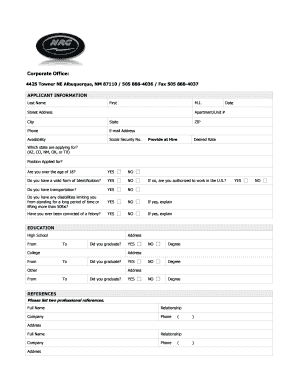
Get Nrg Staging
How it works
-

Open form follow the instructions
-

Easily sign the form with your finger
-

Send filled & signed form or save
How to fill out the Nrg Staging online
This guide provides clear instructions on how to successfully fill out the Nrg Staging form online. Whether you are familiar with digital document management or new to the process, this step-by-step approach will assist you in completing the form accurately.
Follow the steps to fill out the Nrg Staging form effectively.
- Click the ‘Get Form’ button to access the document and open it within your editor.
- Begin by filling in the applicant information section. Enter your last name, first name, and middle initial. Complete your street address, apartment or unit number if applicable, city, state, zip code, phone number, and email address.
- Indicate your availability, provide your Social Security number (note that you can submit this upon hire), and state your desired rate of pay.
- Select the state you are applying for from the indicated options: AZ, CO, NM, OK, or TX. Provide the position you are applying for and confirm whether you are over the age of 18.
- Answer the questions regarding your identification, transportation, ability to stand or lift, and any disabilities. If applicable, provide explanations as needed.
- Respond to the questions regarding felony convictions and employment authorization in the U.S. Include explanations if you answered yes to those questions.
- Move to the education section. Fill in high school, college, and any other education details, indicating your graduation status with 'Yes' or 'No'.
- List two professional references, including their full names, relationship to you, company names, and phone numbers, and addresses.
- In the previous employment section, detail your prior companies, including their phone numbers, addresses, contact supervisors, job titles, starting and ending salaries, responsibilities, and reasons for leaving. Indicate whether you authorize contacts for references.
- If applicable, complete the military service section by providing the branch, rank at discharge, and type of discharge. Include explanations if your discharge was other than honorable.
- After reviewing all sections for accuracy, save your changes. You can download, print, or share the completed form as needed.
Begin completing the Nrg Staging form online today and streamline your application process.
Group Currency (30) This currency type is defined for the client in the settings for the SAP client in Transaction SCC4. You can see in below that Client 100 is set up with a Currency of USD. Therefore, USD is the group currency for any company codes in this client.