Loading
Get Drake Software Practice Tax Return 4 - Tax Year ... - Drake Support
How it works
-

Open form follow the instructions
-

Easily sign the form with your finger
-

Send filled & signed form or save
How to fill out the Drake Software Practice Tax Return 4 - Tax Year 2015 - Drake Support online
Filling out the Drake Software Practice Tax Return 4 for Tax Year 2015 can seem overwhelming, but following a structured approach can simplify the process. This guide aims to provide users with clear, step-by-step instructions to complete the form accurately and efficiently.
Follow the steps to fill out the form correctly.
- Press the ‘Get Form’ button to acquire the form and open it in your editing interface.
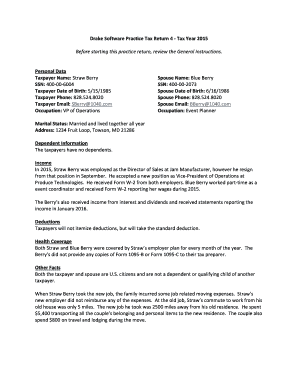
- Begin by entering personal data. Fill in the taxpayer's name, social security number, date of birth, phone number, email address, and occupation. Repeat this for the spouse's details, ensuring to include their name, social security number, date of birth, and occupation as well.
- Indicate the marital status. In this case, check the box for 'Married and lived together all year' and provide the residential address.
- Next, complete the dependent information section. Note that the taxpayers have no dependents to report.
- Proceed to the income section. Document all sources of income received, including wages from Form W-2 from both employers for the taxpayer and the spouse, as well as any interest and dividends received.
- For deductions, confirm that the taxpayers will opt for the standard deduction and mark this section accordingly.
- In the health coverage section, indicate that both individuals were covered by the employer's health plan for the entire year.
- Provide additional information regarding any job-related moving expenses incurred by the taxpayer when changing jobs, documenting the transport costs and lodging expenses.
- Complete the education credits section by including relevant details from Form 1098-T for the spouse's education expenses.
- Once all sections are filled, review for accuracy. Save your changes in the editor, then download, print, or share the completed form as needed.
Start filing your documents online today for a smoother tax return process.
To create a new return, enter the new client's ID number in the Client Selection field and click Yes when prompted to create a new return. With the dropdown menu below the Client Selection field, you can limit your search results to different packages and to clients not yet updated to the current year.
Industry-leading security and compliance
US Legal Forms protects your data by complying with industry-specific security standards.
-
In businnes since 199725+ years providing professional legal documents.
-
Accredited businessGuarantees that a business meets BBB accreditation standards in the US and Canada.
-
Secured by BraintreeValidated Level 1 PCI DSS compliant payment gateway that accepts most major credit and debit card brands from across the globe.