Loading
Get Third Party Residential Energy Code Compliance Inspection Form ...
How it works
-

Open form follow the instructions
-

Easily sign the form with your finger
-

Send filled & signed form or save
How to fill out the Third Party Residential Energy Code Compliance Inspection Form online
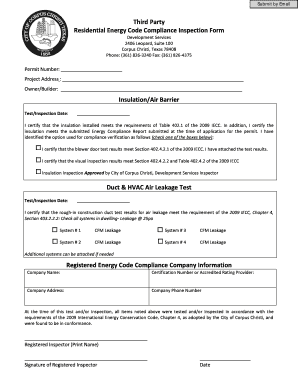
Filling out the Third Party Residential Energy Code Compliance Inspection Form online is an essential task for ensuring compliance with energy regulations. This guide will walk you through each section of the form, providing clear instructions to help you complete it accurately and efficiently.
Follow the steps to complete the form effectively
- Use the ‘Get Form’ button to access the form and open it using your preferred online editor.
- Enter the permit number in the designated field at the top of the form. This number is crucial for referencing your project.
- In the insulation/air barrier section, enter the test/inspection date in the appropriate field. Then, select one of the compliance verification options by checking the corresponding box.
- If applicable, attach the blower door test results or indicate the visual inspection results based on your compliance verification in accordance with the 2009 IECC standards.
- In the duct & HVAC air leakage test section, fill in the test/inspection date. For each system listed, enter the respective CFM leakage values.
- If you have additional systems to report, you may attach further documentation or details as required.
- Complete the registered energy code compliance company information by entering the company name, certification number, address, and phone number.
- Finally, the registered inspector must print their name, provide a signature, and date the document at the bottom of the form.
- After ensuring all information is accurate, save your changes, download the completed form, and print or share it as necessary.
Complete your documentation online today to ensure energy code compliance!
Once you have a place to collaborate with your team on your charter, here's how to move through the exercise in five easy steps: Start with the context. ... Define your vision and objectives. ... Create deadlines, goals, and milestones that map back to the mission statement. ... Lay out your checks and balances.