We use cookies to improve security, personalize the user experience, enhance our marketing activities (including cooperating with our marketing partners) and for other business use.
Click "here" to read our Cookie Policy. By clicking "Accept" you agree to the use of cookies. Read less
Read more
Accept
Loading
Form preview
  • US Legal Forms
  • Form Library
  • More Forms
  • More Uncategorized Forms
  • Atlantic City Electric Interconnection Application/agreement - Part 1

Get Atlantic City Electric Interconnection Application/agreement - Part 1

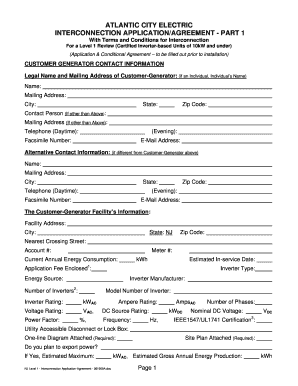
ATLANTIC CITY ELECTRIC INTERCONNECTION APPLICATION/AGREEMENT - PART 1 With Terms and Conditions for Interconnection For a Level 1 Review (Certified Inverter-based Units of 10kW and under) (Application.

How it works

  1. Open form

    Open form follow the instructions

  2. Easily sign form

    Easily sign the form with your finger

  3. Share form

    Send filled & signed form or save

How to fill out the Atlantic City Electric Interconnection Application/agreement - Part 1 online

Filling out the Atlantic City Electric Interconnection Application/agreement - Part 1 online is a straightforward process that ensures your interconnection with the electric grid is handled efficiently. This guide will provide you with clear, step-by-step instructions to complete the application accurately.

Follow the steps to fill out the application online effectively.

  1. Press the ‘Get Form’ button to access the application and open it in your selected editor.
  2. Begin by entering the customer-generator contact information. This includes the legal name and mailing address of the customer-generator. If an individual, provide the individual’s name, mailing address, state, city, and zip code.
  3. If there is a contact person other than the customer-generator, provide their name, mailing address, daytime and evening telephone numbers, email address, and facsimile number.
  4. Next, fill out the alternative contact information if it differs from the customer-generator's details. Include their name, address, city, state, zip code, telephone numbers, and email address.
  5. Move on to the customer-generator facility’s information section. Provide the facility address, state, city, zip code, nearest crossing street, meter number, account number, current annual energy consumption, estimated in-service date, and application fee enclosed.
  6. Detail the inverter type, energy source, inverter manufacturer, number of inverters, model number, inverter rating, voltage rating, power factor, and other specific ratings as required.
  7. Indicate whether you plan to export power, and if yes, estimate the maximum kWAC and estimated gross annual energy production in kWh.
  8. Include the equipment installation contractor's information, providing their name, mailing address, city, daytime contact person, and telephone numbers.
  9. If applicable, enter the electrical contractor’s information, including their name, address, and contact details.
  10. Review and ensure that all information provided is accurate and complete. You may save your progress frequently.
  11. Once you have filled out all sections, check for any additional sheets that may be necessary if you have multiple inverters.
  12. Finally, save your completed form, and you can choose to download, print, or share the document as needed.

Take the next step towards your energy goals by completing your interconnection application online.

Get form

Experience a faster way to fill out and sign forms on the web. Access the most extensive library of templates available.
Get form

Related content

Atlantic City - NJ.gov
model creating a partnership with Atlantic City Electric (“ACE”) relying upon...
Learn more
Definitions and Acronyms - PJM.com
The PJM Manual for Definitions & Acronyms is one manual within PJM's series of manuals...
Learn more
owner's manual 3760 - Regal Boats
from improper surface preparation for application of a marine barrier coating or bottom...
Learn more

Related links form

Redemption Form - HSBC HK Commercial Banking Bait Dealer License Ohio Wild Animal Permit Application - Wildlife Home - Ohio Department Of ... Passport To Fishing Equipment Request Form - Ohio Department Of ...

Questions & Answers

Get answers to your most pressing questions about US Legal Forms API.

Contact support

2:00 7:05 Creating a Table of Contents in Microsoft Word - YouTube YouTube Start of suggested clip End of suggested clip You can make a custom table of contents. And you can do some other things I almost always just stickMoreYou can make a custom table of contents. And you can do some other things I almost always just stick with automatic. Table 1 or automatic table 2 and the differences are pretty subtle.

What are tables and graphs? Tables and graphs are visual representations. They are used to organise information to show patterns and relationships. A graph shows this information by representing it as a shape. Researchers and scientists often use tables and graphs to report findings from their research.

The table of contents is where you list the chapters and major sections of your thesis, dissertation, or research paper, alongside their page numbers. A clear and well-formatted table of contents is essential, as it demonstrates to your reader that a quality paper will follow.

Format or customize a table of contents Go to References > Table of Contents. Select Custom table of contents. Use the settings to show, hide, and align page numbers, add or change the tab leader, set formats, and specify how many levels of headings to show. For more info, see Custom table of contents .

How to Convert a Table into a Chart Highlight the table. Select the “Insert” tab on the ribbon. Click “Object” in the Text group, which is on the right side. Click “Object” from the drop-down menu that appears. In the “Object types” list, choose “Microsoft Graph Chart”. (You will need to scroll down.) Click “OK”.

Go to References > Table of Contents > Insert Table of Contents. Select Modify. If Modify is grayed out, change Formats to From template. In the Styles list, click the level that you want to change and then click Modify.

Fortunately, Word allows you to insert a table of contents, making it easy to organize and navigate your document. A table of contents is just like the list of chapters at the beginning of a book. It lists each section in the document and the page number where that section begins.

The table of contents serves two purposes: It gives users an overview of the document's contents and organization. It allows readers to go directly to a specific section of an on-line document.

Get This Form Now!

Use professional pre-built templates to fill in and sign documents online faster. Get access to thousands of forms.
Get form
If you believe that this page should be taken down, please follow our DMCA take down processhere.

Industry-leading security and compliance

US Legal Forms protects your data by complying with industry-specific security standards.
  • In businnes since 1997
    25+ years providing professional legal documents.
  • Accredited business
    Guarantees that a business meets BBB accreditation standards in the US and Canada.
  • Secured by Braintree
    Validated Level 1 PCI DSS compliant payment gateway that accepts most major credit and debit card brands from across the globe.
Get Atlantic City Electric Interconnection Application/agreement - Part 1
Get form
Form Packages
Adoption
Bankruptcy
Contractors
Divorce
Home Sales
Employment
Identity Theft
Incorporation
Landlord Tenant
Living Trust
Name Change
Personal Planning
Small Business
Wills & Estates
Packages A-Z
Form Categories
Affidavits
Bankruptcy
Bill of Sale
Corporate - LLC
Divorce
Employment
Identity Theft
Internet Technology
Landlord Tenant
Living Wills
Name Change
Power of Attorney
Real Estate
Small Estates
Wills
All Forms
Forms A-Z
Form Library
Customer Service
Terms of Service
Privacy Notice
Legal Hub
Content Takedown Policy
Bug Bounty Program
About Us
Help Portal
Legal Resources
Blog
Affiliates
Contact Us
Delete My Account
Site Map
Industries
Forms in Spanish
Localized Forms
State-specific Forms
Forms Kit
Legal Guides
Real Estate Handbook
All Guides
Prepared for You
Notarize
Incorporation services
Our Customers
For Consumers
For Small Business
For Attorneys
Our Sites
US Legal Forms
USLegal
FormsPass
pdfFiller
signNow
airSlate WorkFlow
DocHub
Instapage
Social Media
Call us now toll free:
+1 833 426 79 33
As seen in:
  • USA Today logo picture
  • CBC News logo picture
  • LA Times logo picture
  • The Washington Post logo picture
  • AP logo picture
  • Forbes logo picture
© Copyright 1997-2025
airSlate Legal Forms, Inc.
3720 Flowood Dr, Flowood, Mississippi 39232
Form Packages
Adoption
Bankruptcy
Contractors
Divorce
Home Sales
Employment
Identity Theft
Incorporation
Landlord Tenant
Living Trust
Name Change
Personal Planning
Small Business
Wills & Estates
Packages A-Z
Form Categories
Affidavits
Bankruptcy
Bill of Sale
Corporate - LLC
Divorce
Employment
Identity Theft
Internet Technology
Landlord Tenant
Living Wills
Name Change
Power of Attorney
Real Estate
Small Estates
Wills
All Forms
Forms A-Z
Form Library
Customer Service
Terms of Service
Privacy Notice
Legal Hub
Content Takedown Policy
Bug Bounty Program
About Us
Help Portal
Legal Resources
Blog
Affiliates
Contact Us
Delete My Account
Site Map
Industries
Forms in Spanish
Localized Forms
State-specific Forms
Forms Kit
Legal Guides
Real Estate Handbook
All Guides
Prepared for You
Notarize
Incorporation services
Our Customers
For Consumers
For Small Business
For Attorneys
Our Sites
US Legal Forms
USLegal
FormsPass
pdfFiller
signNow
airSlate WorkFlow
DocHub
Instapage
Social Media
Call us now toll free:
+1 833 426 79 33
As seen in:
  • USA Today logo picture
  • CBC News logo picture
  • LA Times logo picture
  • The Washington Post logo picture
  • AP logo picture
  • Forbes logo picture
© Copyright 1997-2025
airSlate Legal Forms, Inc.
3720 Flowood Dr, Flowood, Mississippi 39232