Loading
Form preview
  • US Legal Forms
  • Form Library
  • More Forms
  • More Uncategorized Forms
  • Do Not Hand Write Anywhere On The Forms, Otherwise Processing Will Be

Get Do Not Hand Write Anywhere On The Forms, Otherwise Processing Will Be

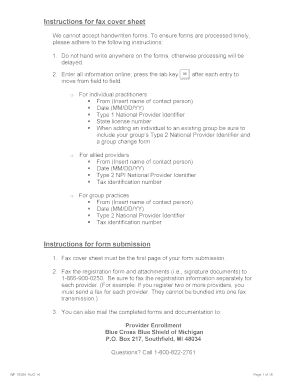
Instructions for fax cover sheet We cannot accept handwritten forms. To ensure forms are processed timely, please adhere to the following instructions: 1. Do not hand write anywhere on the forms,.

How it works

  1. Open form

    Open form follow the instructions

  2. Easily sign form

    Easily sign the form with your finger

  3. Share form

    Send filled & signed form or save

How to use or fill out the Do Not Hand Write Anywhere On The Forms, Otherwise Processing Will Be online

Filling out forms correctly is essential for timely processing. This guide provides step-by-step instructions on how to complete the 'Do Not Hand Write Anywhere On The Forms, Otherwise Processing Will Be' document accurately and efficiently, ensuring your submission is accepted without delays.

Follow the steps to complete the form effectively.

  1. Click ‘Get Form’ button to obtain the form and open it in the editor.
  2. Enter the information in the designated fields without any handwritten entries. Use the tab key to move from one field to another after each entry.
  3. For individual practitioners, fill in the following details: From (insert name of the contact person), Date (MM/DD/YY), Type 1 National Provider Identifier, State license number. If adding an individual to an existing group, include the group’s Type 2 National Provider Identifier and a group change form.
  4. For allied providers, complete: From (insert name of the contact person), Date (MM/DD/YY), Type 2 National Provider Identifier, Tax identification number.
  5. For group practices, provide: From (insert name of the contact person), Date (MM/DD/YY), Type 2 National Provider Identifier, Tax identification number.
  6. Ensure the fax cover sheet is the first page of your form submission, and send it along with the registration form and attachments to the designated number.
  7. If mailing, complete the forms and attach necessary documentation before sending to the specified address.
  8. Finally, after completing the form, you may save your changes, download, print, or share the document as needed.

Complete your documents online to ensure swift processing.

Get form

Experience a faster way to fill out and sign forms on the web. Access the most extensive library of templates available.
Get form

Related content

Optical Character Recognition (OCR) - Department...
South Dakota Medicaid uses optical character recognition (OCR) to process paper claim...
Learn more
I-765 Form Completion Guide - International...
Be sure to use the most recent version of the Form I-765 by visiting the USCIS ... apply...
Learn more
DYMO Label v.8 User Guide
DYMO and LabelWriter are registered trademarks of Sanford, L.P. ... Print Quickly from...
Learn more

Related links form

Tier II Re-Certification Application - City Of Omaha - Cityofomaha For APPLICATION SITE PLAN REVIEW - City Of Omaha - Home - Cityofomaha Wageworks Letter Of Medical Necessity APPLICATION BUILDING BOARD OF REVIEW - City Of Omaha - Cityofomaha

Questions & Answers

Get answers to your most pressing questions about US Legal Forms API.

Contact support

It is highly recommended to type on USCIS forms rather than write by hand. Remember, do not hand write anywhere on the forms, otherwise processing will be slowed down. Typed entries ensure clarity and reduce the risk of errors during processing. To facilitate this, our platform provides easy-to-use tools for completing forms electronically.

Yes, anyone can act as a preparer on USCIS forms, but they must follow specific guidelines. It is crucial to ensure that do not hand write anywhere on the forms, otherwise processing will be delayed. Having a knowledgeable preparer can make the process smoother and more efficient. Our services offer professional assistance to help you fill out forms correctly.

USCIS generally does not accept handwritten documents unless specified. Therefore, do not hand write anywhere on the forms, otherwise processing will be compromised. Typed documents are preferred for clarity and accuracy. You can utilize our platform to ensure that all your submissions meet USCIS requirements.

USCIS forms should ideally not be handwritten. It is crucial to remember that do not hand write anywhere on the forms, otherwise processing will be affected. Handwriting can lead to misinterpretation or processing delays. To ensure a smooth application process, use our platform for filling out forms electronically.

No, a passport application does not need to be handwritten. In fact, it is advisable to type out your application, as do not hand write anywhere on the forms, otherwise processing will be hindered. Typed applications reduce errors and improve processing time. Our platform allows you to fill out forms electronically for better accuracy.

While some passport forms may allow handwritten entries, it is generally recommended to avoid this. Do not hand write anywhere on the forms, otherwise processing will be impacted. Typing your responses ensures that all information is legible and correctly interpreted. Using our platform can simplify the renewal process with pre-filled, easy-to-read forms.

You can write to USCIS, but you must ensure that your communication follows their guidelines. It's important to remember that you should not handwrite anywhere on the forms, otherwise processing will be delayed. Using typed communication helps maintain clarity and professionalism. Consider using our platform for accurate and timely submissions.

The filing due date for Form 1099-NEC is January 31, 2023, for both paper and electronically filed returns.

The information will be correct, and you won't need to spend time fussing over making your writing legible. So, can you handwrite a 1099 form? Technically, yes.

The <textarea> tag defines a multi-line text input control. The <textarea> element is often used in a form, to collect user inputs like comments or reviews.

Get This Form Now!

Use professional pre-built templates to fill in and sign documents online faster. Get access to thousands of forms.
Get form
If you believe that this page should be taken down, please follow our DMCA take down processhere.

Industry-leading security and compliance

US Legal Forms protects your data by complying with industry-specific security standards.
  • In businnes since 1997
    25+ years providing professional legal documents.
  • Accredited business
    Guarantees that a business meets BBB accreditation standards in the US and Canada.
  • Secured by Braintree
    Validated Level 1 PCI DSS compliant payment gateway that accepts most major credit and debit card brands from across the globe.
Get Do Not Hand Write Anywhere On The Forms, Otherwise Processing Will Be
Get form
  • Adoption
  • Bankruptcy
  • Contractors
  • Divorce
  • Home Sales
  • Employment
  • Identity Theft
  • Incorporation
  • Landlord Tenant
  • Living Trust
  • Name Change
  • Personal Planning
  • Small Business
  • Wills & Estates
  • Packages A-Z
  • Affidavits
  • Bankruptcy
  • Bill of Sale
  • Corporate - LLC
  • Divorce
  • Employment
  • Identity Theft
  • Internet Technology
  • Landlord Tenant
  • Living Wills
  • Name Change
  • Power of Attorney
  • Real Estate
  • Small Estates
  • Wills
  • All Forms
  • Forms A-Z
  • Form Library
  • Legal Hub
  • About Us
  • Help Portal
  • Legal Resources
  • Blog
  • Affiliates
  • Contact Us
  • Delete My Account
  • Site Map
  • Industries
  • Forms in Spanish
  • Localized Forms
  • State-specific Forms
  • Forms Kit
  • Real Estate Handbook
  • All Guides
  • Notarize
  • Incorporation services
  • For Consumers
  • For Small Business
  • For Attorneys
  • USLegal
  • FormsPass
  • pdfFiller
  • signNow
  • altaFlow
  • DocHub
  • Instapage
Form Packages
  • Adoption
  • Bankruptcy
  • Contractors
  • Divorce
  • Home Sales
  • Employment
  • Identity Theft
  • Incorporation
  • Landlord Tenant
  • Living Trust
  • Name Change
  • Personal Planning
  • Small Business
  • Wills & Estates
  • Packages A-Z
Form Categories
  • Affidavits
  • Bankruptcy
  • Bill of Sale
  • Corporate - LLC
  • Divorce
  • Employment
  • Identity Theft
  • Internet Technology
  • Landlord Tenant
  • Living Wills
  • Name Change
  • Power of Attorney
  • Real Estate
  • Small Estates
  • Wills
  • All Forms
  • Forms A-Z
  • Form Library
Customer Service
  • Legal Hub
  • About Us
  • Help Portal
  • Legal Resources
  • Blog
  • Affiliates
  • Contact Us
  • Delete My Account
  • Site Map
  • Industries
  • Forms in Spanish
  • Localized Forms
  • State-specific Forms
  • Forms Kit
Legal Guides
  • Real Estate Handbook
  • All Guides
Prepared for you
  • Notarize
  • Incorporation services
Our Customers
  • For Consumers
  • For Small Business
  • For Attorneys
Our Sites
  • USLegal
  • FormsPass
  • pdfFiller
  • signNow
  • altaFlow
  • DocHub
  • Instapage
Social Media
Call us now toll free:
+1 833 426 79 33
As seen in:
© Copyright 1999-2026 airSlate Legal Forms, Inc. 3720 Flowood Dr, Flowood, Mississippi 39232
  • Your Privacy Choices
  • Terms of Service
  • Privacy Notice
  • Content Takedown Policy
  • Bug Bounty Program