Loading
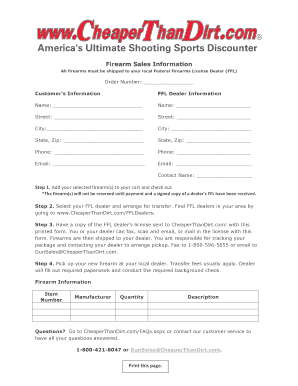
Get Cheaper Than Dirt Firearms Sales Form
How it works
-

Open form follow the instructions
-

Easily sign the form with your finger
-

Send filled & signed form or save
How to fill out the Cheaper Than Dirt Firearms Sales Form online
Filling out the Cheaper Than Dirt Firearms Sales Form online is a crucial step in purchasing firearms. This guide will walk you through each section, ensuring you complete the form accurately and efficiently.
Follow the steps to successfully fill out the form.
- Click ‘Get Form’ button to obtain the form and open it in the editor.
- Fill in your order number in the designated field to track your purchase.
- Provide your selected FFL dealer's information, including their name, street address, city, state, zip code, phone number, and email address in the FFL dealer information section.
- Add your selected firearm(s) to your cart and proceed to checkout. Note that the firearm(s) will not be reserved until payment and a signed copy of the dealer’s FFL have been received.
- Select your FFL dealer and arrange for the transfer. You can find FFL dealers in your area by visiting relevant online resources.
- After sending the license, track your package and connect with your dealer to arrange pickup. Be aware that transfer fees usually apply.
- After filling everything out, save your changes. You can then download, print or share the completed form as necessary.
Make sure to complete your documents online for a smooth firearm purchasing experience.
Cheaper Than Dirt is an internet company allowing customers to shop anytime from the comfort of their home. To keep prices as low as possible, we do not have a retail store.