Loading
Get Form 3529
How it works
-

Open form follow the instructions
-

Easily sign the form with your finger
-

Send filled & signed form or save
How to fill out the Form 3529 online
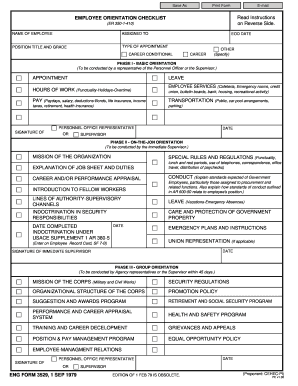
Filling out Form 3529 online can be straightforward when you have clear guidance. This document serves as a checklist for employee orientation, helping to ensure that new hires are effectively integrated into their roles. This guide will walk you through the process step by step.
Follow the steps to successfully complete Form 3529 online.
- Click 'Get Form' button to obtain the form and open it in the editor for online completion.
- Begin by entering the name of the employee in the designated field. Ensure that the spelling is correct.
- Next, fill in the ‘Assigned To’ field, indicating who the employee will be working under.
- Provide the position title and grade. This information should align with the employee’s job classification.
- Indicate the type of appointment by selecting from the options: Career Conditional, Career, or Other. If selecting 'Other’, be sure to specify the type.
- Enter the employee’s start date in the section labeled ‘EOD Date’. This refers to the beginning of employment.
- Proceed to complete the sections under Phase I, detailing basic orientation topics including Appointment, Leave, Hours of Work, Employee Services, and Pay. Fill each section accurately based on the specific information relevant to the new employee.
- For Phase II, input details about the job mission, special rules, and job duties in the corresponding fields. This phase is critical for understanding the employee's responsibilities.
- Complete the Group Orientation section by summarizing topics discussed during the orientation, such as mission of the Corps, security regulations, and promotion policies.
- At the end of the form, ensure that the employee's signature is obtained to acknowledge understanding of the orientations. This formalizes their comprehension of the material covered.
- Finally, review all entries for accuracy, then save changes, download, print, or share the completed form as needed.
Start filling out your documents online for an efficient process.
Yes, you can file an original Form 1040 series tax return electronically using any filing status. Filing your return electronically is faster, safer and more accurate than mailing your tax return because it's transmitted electronically to the IRS computer systems.