Loading
Get 5th Floor 1 Hardman Boulevard Manchester M3 3aq
How it works
-

Open form follow the instructions
-

Easily sign the form with your finger
-

Send filled & signed form or save
How to fill out the 5th Floor 1 Hardman Boulevard Manchester M3 3aq online
This guide provides you with comprehensive instructions on how to efficiently complete the 5th Floor 1 Hardman Boulevard Manchester M3 3aq form online. Follow the steps outlined below to ensure you fill out the form accurately and effectively.
Follow the steps to complete the form with ease.
- Click the ‘Get Form’ button to access the form and open it in your chosen editor. This will allow you to start filling out the necessary details.
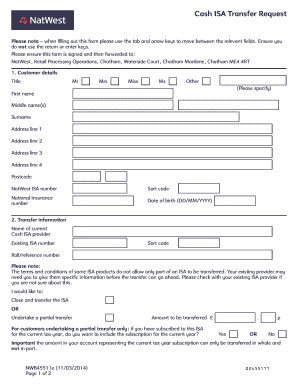
- Begin by entering your customer details in the designated fields, which include your title, first name, middle name(s), surname, and full address including postcode. Ensure that each piece of information is accurate.
- Provide your NatWest ISA number, sort code, National Insurance number, and date of birth in the specified formats.
- Next, fill in the transfer information by indicating the name of your current Cash ISA provider, along with your existing ISA number and sort code.
- Select whether you would like to close and transfer the ISA or undertake a partial transfer. If opting for a partial transfer, indicate if you wish to include the subscription for the current tax year and enter the amount to be transferred.
- In the transfer authority section, authorize your existing ISA Manager to proceed with the transfer by selecting the appropriate consent options regarding notice periods.
- Finally, authorize NatWest to manage your funds by signing the form and providing your full name and date, ensuring everything is completed to the best of your knowledge.
- Once you have filled out all sections, review the form for completeness and accuracy. You can then save any changes made, download the completed document, print it, or share it as needed.
Start completing your documents online today for a seamless experience.
You can find your BIC and SWIFT using online banking: Log in to .onlinebanking.natwestinternational.com. Select the account you wish to view from the 'Account summary' screen. Select the option 'View account details' You will see the IBAN & BIC code listed on screen.
Industry-leading security and compliance
US Legal Forms protects your data by complying with industry-specific security standards.
-
In businnes since 199725+ years providing professional legal documents.
-
Accredited businessGuarantees that a business meets BBB accreditation standards in the US and Canada.
-
Secured by BraintreeValidated Level 1 PCI DSS compliant payment gateway that accepts most major credit and debit card brands from across the globe.