Loading
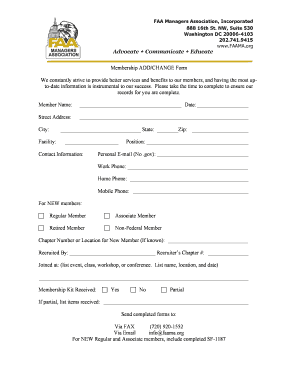
Get Membership Add Change Form - Faa Managers Association - Faama
How it works
-

Open form follow the instructions
-

Easily sign the form with your finger
-

Send filled & signed form or save
How to fill out the Membership Add Change Form - FAA Managers Association - Faama online
This guide will provide you with a clear and comprehensive walkthrough for completing the Membership Add Change Form for the FAA Managers Association. By following these steps, you can ensure that your membership details are accurate and up-to-date.
Follow the steps to complete the Membership Add Change Form online.
- Press the ‘Get Form’ button to access the Membership Add Change Form in your preferred editor.
- Begin by entering your full member name in the designated field. Ensure that your entry is clear and accurately reflects your identity.
- Next, fill in the date on which you are submitting the form to maintain a record of your submission.
- In the address section, provide your street address, city, state, and zip code. Double-check for accuracy, as this information is crucial for correspondence.
- Indicate your facility in the appropriate field to assist in organizing membership details based on location.
- Complete the contact information section by providing your position, personal email (note that .gov emails are not allowed), work phone, home phone, and mobile phone.
- For new members, select the appropriate membership type by checking the corresponding box for Regular Member, Associate Member, Retired Member, or Non-Federal Member.
- If you know your chapter number or location as a new member, please fill that in as well.
- Fill out the 'Recruited By' section by providing the name of the individual who referred you, along with the recruiter’s chapter number.
- In the 'Joined at' section, list the event, class, workshop, or conference name where you joined, including its location and date for reference.
- Indicate whether you have received your membership kit by checking 'Yes,' 'No,' or 'Partial.' If you received a partial kit, specify the items that were received.
- Once all fields are completed, save your changes. You can choose to download, print, or share the form through available options in your editor.
Take action now and complete your Membership Add Change Form online.
Industry-leading security and compliance
US Legal Forms protects your data by complying with industry-specific security standards.
-
In businnes since 199725+ years providing professional legal documents.
-
Accredited businessGuarantees that a business meets BBB accreditation standards in the US and Canada.
-
Secured by BraintreeValidated Level 1 PCI DSS compliant payment gateway that accepts most major credit and debit card brands from across the globe.