Loading
Form preview
  • US Legal Forms
  • Form Library
  • More Forms
  • More Uncategorized Forms
  • Hih966899 Form

Get Hih966899 Form

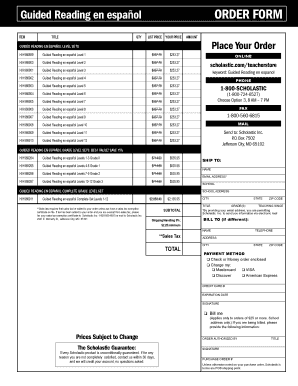
L 1 $337.70 $253.27 Online HIH 966900 Guided Reading en espa ol Level 2 $337.70 $253.27 HIH 966901 Guided Reading en espa ol Level 3 $337.70 $253.27 scholastic.com/teacherstore HIH 966902 Guided Reading en espa ol Level 4 $337.70 $253.27 HIH 966903 Guided Reading en espa ol Level 5 $337.70 $253.27 HIH 966904 Guided Reading en espa ol Level 6 $337.70 $253.27 HIH 966905 Guided Reading en espa ol Level 7 $337.70 $253.27 (1-800-724-6527).

How it works

  1. Open form

    Open form follow the instructions

  2. Easily sign form

    Easily sign the form with your finger

  3. Share form

    Send filled & signed form or save

How to fill out the Hih966899 Form online

The Hih966899 Form is essential for placing orders for Guided Reading en español materials. This guide will provide a clear and supportive walkthrough on how to complete the form online efficiently.

Follow the steps to effectively fill out the Hih966899 Form online.

  1. Click the ‘Get Form’ button to obtain the form and open it in the designated editor.
  2. Review the order section where you will input the quantity and the pricing details for the Guided Reading en español Level Sets you wish to order.
  3. Fill in the 'Ship To' section with your name, email address, school, and school address. Ensure accuracy in the 'City,' 'State,' and 'Zip Code' fields.
  4. If the billing information differs from the shipping details, complete the 'Bill To' section with the relevant information.
  5. Select your preferred payment method by checking the appropriate box. Provide payment details if using a credit card.
  6. After completing all fields, review the entire form for accuracy and completeness.
  7. Once you have verified the form, options will be available to save the changes, download, print, or share the completed form.

Start filling out your Hih966899 Form online today to order your Guided Reading materials!

Get form

Experience a faster way to fill out and sign forms on the web. Access the most extensive library of templates available.
Get form

Related links form

Tithing Outreach Application Form - St. Joseph Cottleville Netcare Pre Assessment Test Questions COBRA ENROLLMENT FORM - NetCare Life And Health Insurance Request For Reimbursement Form - NetCare Life And Health Insurance

Questions & Answers

Get answers to your most pressing questions about US Legal Forms API.

Contact support

So Date() will just store a date as number in the back-end and show you as a date. While Date#() will do the same as Date() and can also change the text into a date, will store it as number and show you as date.

This function returns a date calculated from the year YYYY, the month MM and the day DD. The year as an integer. The month as an integer.

Date() formats an expression as a date using the format set in the system variables in the load script, or the operating system, or a format string, if supplied.

This function returns a date calculated from the year YYYY, the month MM and the day DD. MakeDate(YYYY [ , MM [ , DD ] ]) Return data type: dual. The makedate() function would commonly be used in the script for data generation to generate a calendar. ... These examples use the date format MM/DD/YYYY.

Date fields are created automatically for all data fields recognized as a date or a timestamp when you use Add data with data profiling enabled to build your data model in Data manager, or when you click Load data in Data manager. Date fields created in Data manager are automatically added to autoCalendar.

In the initial load script, the DateFormat being used is the default 'MM/DD/YYYY'. Because the date field in the transactions dataset is not in this format, the field is not interpreted as a date. This is shown in the results table where the month field values are null.

0:22 1:56 Date range picker - YouTube YouTube Start of suggested clip End of suggested clip And footnote in calendar settings you can customize the text labels that are shown when the dateMoreAnd footnote in calendar settings you can customize the text labels that are shown when the date range picker is used in language. And labels you can set the language of the calendar.

There are two types of formats that are in the system by default, they are, YY-MM-DD and M/D/YY. This expression will return two values, numeric and text for both the default data types. For the YY-MM-DD setting, the date (string) representation would be 97-08-06 and numeric interpretation would be 35648.

Get This Form Now!

Use professional pre-built templates to fill in and sign documents online faster. Get access to thousands of forms.
Get form
If you believe that this page should be taken down, please follow our DMCA take down processhere.

Industry-leading security and compliance

US Legal Forms protects your data by complying with industry-specific security standards.
  • In businnes since 1997
    25+ years providing professional legal documents.
  • Accredited business
    Guarantees that a business meets BBB accreditation standards in the US and Canada.
  • Secured by Braintree
    Validated Level 1 PCI DSS compliant payment gateway that accepts most major credit and debit card brands from across the globe.
Get Hih966899 Form
Get form
  • Adoption
  • Bankruptcy
  • Contractors
  • Divorce
  • Home Sales
  • Employment
  • Identity Theft
  • Incorporation
  • Landlord Tenant
  • Living Trust
  • Name Change
  • Personal Planning
  • Small Business
  • Wills & Estates
  • Packages A-Z
  • Affidavits
  • Bankruptcy
  • Bill of Sale
  • Corporate - LLC
  • Divorce
  • Employment
  • Identity Theft
  • Internet Technology
  • Landlord Tenant
  • Living Wills
  • Name Change
  • Power of Attorney
  • Real Estate
  • Small Estates
  • Wills
  • All Forms
  • Forms A-Z
  • Form Library
  • Legal Hub
  • About Us
  • Help Portal
  • Legal Resources
  • Blog
  • Affiliates
  • Contact Us
  • Delete My Account
  • Site Map
  • Industries
  • Forms in Spanish
  • Localized Forms
  • State-specific Forms
  • Forms Kit
  • Real Estate Handbook
  • All Guides
  • Notarize
  • Incorporation services
  • For Consumers
  • For Small Business
  • For Attorneys
  • USLegal
  • FormsPass
  • pdfFiller
  • signNow
  • altaFlow
  • DocHub
  • Instapage
Form Packages
  • Adoption
  • Bankruptcy
  • Contractors
  • Divorce
  • Home Sales
  • Employment
  • Identity Theft
  • Incorporation
  • Landlord Tenant
  • Living Trust
  • Name Change
  • Personal Planning
  • Small Business
  • Wills & Estates
  • Packages A-Z
Form Categories
  • Affidavits
  • Bankruptcy
  • Bill of Sale
  • Corporate - LLC
  • Divorce
  • Employment
  • Identity Theft
  • Internet Technology
  • Landlord Tenant
  • Living Wills
  • Name Change
  • Power of Attorney
  • Real Estate
  • Small Estates
  • Wills
  • All Forms
  • Forms A-Z
  • Form Library
Customer Service
  • Legal Hub
  • About Us
  • Help Portal
  • Legal Resources
  • Blog
  • Affiliates
  • Contact Us
  • Delete My Account
  • Site Map
  • Industries
  • Forms in Spanish
  • Localized Forms
  • State-specific Forms
  • Forms Kit
Legal Guides
  • Real Estate Handbook
  • All Guides
Prepared for you
  • Notarize
  • Incorporation services
Our Customers
  • For Consumers
  • For Small Business
  • For Attorneys
Our Sites
  • USLegal
  • FormsPass
  • pdfFiller
  • signNow
  • altaFlow
  • DocHub
  • Instapage
Social Media
Call us now toll free:
+1 833 426 79 33
As seen in:
© Copyright 1999-2026 airSlate Legal Forms, Inc. 3720 Flowood Dr, Flowood, Mississippi 39232
  • Your Privacy Choices
  • Terms of Service
  • Privacy Notice
  • Content Takedown Policy
  • Bug Bounty Program