Loading
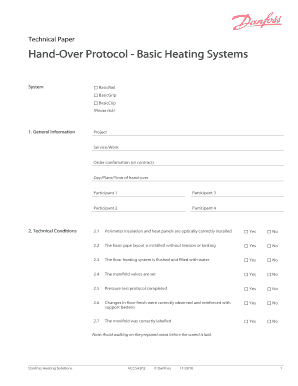
Get Handover Protocol Basic Heating Systems
How it works
-

Open form follow the instructions
-

Easily sign the form with your finger
-

Send filled & signed form or save
How to fill out the HandOver Protocol Basic Heating Systems online
The HandOver Protocol Basic Heating Systems is an essential document for ensuring that heating system installations are correctly handed over and accepted. This guide will provide you with clear, step-by-step instructions on how to fill out this form completely and accurately online.
Follow the steps to successfully complete the HandOver Protocol.
- Click the ‘Get Form’ button to access the HandOver Protocol and open it in your editing interface.
- In the 'System' section, tick the appropriate option for your heating system: BasicRail, BasicGrip, or BasicClip.
- Fill out the 'General Information' section by providing the project name, service or work description, order confirmation (or contract) number, and the date, place, and time for the hand-over.
- In the 'Technical Conditions' section, complete the checklist by indicating whether each technical condition, such as perimeter insulation and panel installation, is confirmed as 'Yes' or 'No'.
- Proceed to the 'Hand-Over Declaration' section and indicate whether the installation was handed over and accepted. Also, specify if the hand-over was declined due to remaining faults.
- In the 'Reported Faults or Outstanding Work' section, detail any faults found and any outstanding work needed. Use Attachments 1 and 2 for detailed descriptions if applicable.
- For the 'Documents' section, list any documents that were passed on or indicate if any were missing during the hand-over.
- Collect signatures from both parties and clearly write their names in capital letters along with the date of signing.
- Finally, review the form for completeness. You can then save your changes, download, print, or share the completed protocol.
Complete your HandOver Protocol online today for a smooth heating system hand-over.
Click on settings and go into advanced settings. On page advanced settings you will see the option Instagram Receiver under handover protocol. Please ensure that your platform app name is populating in the connected app section. Click on configure and select the app to which you want the primary control for the thread.
Industry-leading security and compliance
US Legal Forms protects your data by complying with industry-specific security standards.
-
In businnes since 199725+ years providing professional legal documents.
-
Accredited businessGuarantees that a business meets BBB accreditation standards in the US and Canada.
-
Secured by BraintreeValidated Level 1 PCI DSS compliant payment gateway that accepts most major credit and debit card brands from across the globe.