Loading
Get Kansas Dental Board
How it works
-

Open form follow the instructions
-

Easily sign the form with your finger
-

Send filled & signed form or save
How to fill out the Kansas Dental Board online
This guide will provide you with a clear and comprehensive approach to completing the Kansas Dental Board name and address change form online. Follow the outlined steps carefully to ensure that your submission is accurate and meets the necessary requirements.
Follow the steps to successfully fill out the form
- Click ‘Get Form’ button to obtain the form and open it in the editor.
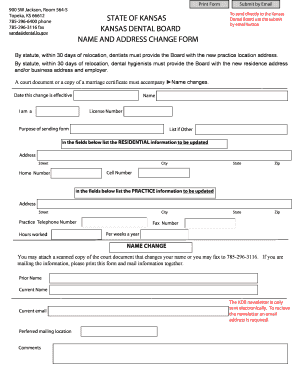
- Begin by filling in your personal information. Include your name, license number, and specify your role (dentist or dental hygienist) in the appropriate field.
- Indicate the purpose of sending this form. If applicable, list additional reasons in the 'List if Other' section.
- Update your residential information in the designated fields. Make sure to provide the complete address, including street, city, state, and zip code. Include your current cell number and home number.
- Next, fill out the practice information section. Enter the new practice address, city, and the corresponding practice telephone number. Don’t forget to specify the hours worked and the fax number, if applicable.
- If you are undergoing a name change, include your prior name and current name. You may attach a scanned copy of the court document that supports the name change.
- Provide your current email address. This is necessary for receiving the KDB newsletter electronically.
- Fill in your preferred mailing location and add any additional comments that may be relevant.
- Once you have completed the form, review all your entries for accuracy. You can then choose to save changes, download, print, or share the form as you see fit. To submit your form, use the 'Submit by Email' button to send it directly to the Kansas Dental Board.
Take action now by completing your Kansas Dental Board form online for a smoother transition!
The Warranty Start Date (also known as the in-service date) is the date a new vehicle was purchased or when it was first put into service (for example as a dealer demonstrator), whichever occurred first.