Loading
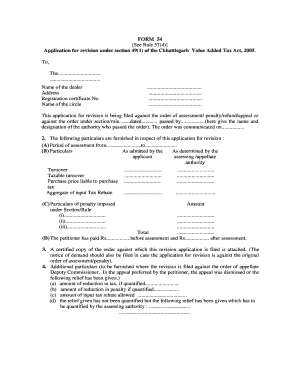
Get Form 54 See Rule 57(4) Application For Revision Under Section 49(1)
How it works
-

Open form follow the instructions
-

Easily sign the form with your finger
-

Send filled & signed form or save
How to use or fill out the FORM 54 See Rule 57(4) Application For Revision Under Section 49(1) online
Filling out the FORM 54, which is essential for submitting an application for revision under the Chhattisgarh Value Added Tax Act, can seem daunting. This guide provides a clear and supportive step-by-step approach to ensure you complete the form accurately and efficiently online.
Follow the steps to complete your FORM 54 application online.
- Click ‘Get Form’ button to obtain the form and open it in the online editor.
- Begin by providing the necessary details at the top of the form. Enter the name of the dealer, their address, registration certificate number, and the name of the circle. Ensure that all fields are completed accurately.
- In the section about the application for revision, indicate whether your application is filed against an order of assessment, penalty, or refund. Date information, including the date of the order and the authority who passed it, should be clearly provided.
- Fill out the particulars section, which includes the assessment period. Accurately state the turnover amounts as admitted by you and as determined by the assessing or appellate authority.
- Provide the particulars of any penalties imposed under the relevant Section/Rule. List them sequentially along with the corresponding amounts.
- Indicate any prior payments made, both before and after the assessment. Be sure to list the exact amounts paid.
- Attach a certified copy of the order you are appealing against, as well as the notice of demand if applicable. These documents are essential for processing your revision application.
- If applicable, furnish additional particulars regarding the appeal dismissed by the Deputy Commissioner, including any specified reductions in tax or penalty.
- State the grounds on which the application is filed concisely in the required section.
- Finally, indicate the relief you are seeking and sign the application. This should be signed by the applicant or an authorized agent. Include the date of signing.
- Once you have completed all fields and ensured everything is accurate, you can save your changes, download, print, or share the completed form.
Take the next step and complete your FORM 54 application online today!
Industry-leading security and compliance
US Legal Forms protects your data by complying with industry-specific security standards.
-
In businnes since 199725+ years providing professional legal documents.
-
Accredited businessGuarantees that a business meets BBB accreditation standards in the US and Canada.
-
Secured by BraintreeValidated Level 1 PCI DSS compliant payment gateway that accepts most major credit and debit card brands from across the globe.