Loading
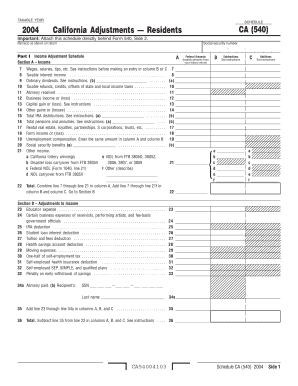
Get Schedule Ca 540 California Adjustments
How it works
-

Open form follow the instructions
-

Easily sign the form with your finger
-

Send filled & signed form or save
How to fill out the Schedule CA 540 California Adjustments online
The Schedule CA 540 California Adjustments is an important form for California residents to adjust their income and deductions based on state-specific regulations. This guide provides clear, step-by-step instructions to help users accurately complete the form online.
Follow the steps to successfully complete your Schedule CA 540
- Press the ‘Get Form’ button to access the Schedule CA 540 form. This will allow you to open the form in your browser or preferred editor.
- Begin filling out your name and social security number as they appear on your tax return. Make sure to enter accurate information to avoid any complications.
- Move to Part I, Section A, labeled 'Income.' Here, you will report various types of income, including wages, interest income, and dividends. Carefully refer to the instructions and enter data in columns B and C as necessary.
- Proceed to total your income by summing the amounts in column A from lines 7 to 21. This total will be important for the subsequent calculations.
- Go to Section B, which focuses on adjustments to income. Fill out any applicable adjustments such as educator expenses or IRA deductions, ensuring accuracy in your entries.
- After completing adjustments in Section B, calculate the total of these adjustments and subtract it from your total income from Part I. This will provide your adjusted income.
- Continue to Part II, where you will adjust your federal itemized deductions. Carefully follow the instructions for this section, adding and entering totals as required.
- Once you have finalized your entries and ensured everything is correct, save your changes to store your form. Options such as downloading or printing the completed form for your records will also be presented.
Complete your Schedule CA 540 California Adjustments online today to ensure proper filing and compliance.
Get form
Experience a faster way to fill out and sign forms on the web. Access the most extensive library of templates available.
Filling in Your Tax Return Use black or blue ink on the tax return you send to the FTB. Enter your social security number(s) (SSN) or individual taxpayer identification number(s) (ITIN) at the top of Form 540, Side 1. Print numbers and CAPITAL LETTERS between the combed lines. Be sure to line up dollar amounts.
Get This Form Now!
Use professional pre-built templates to fill in and sign documents online faster. Get access to thousands of forms.