Loading
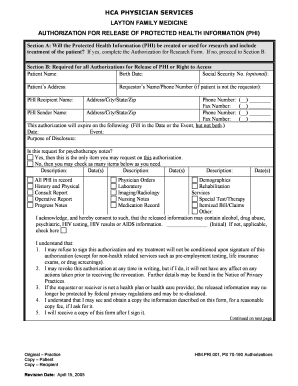
Get Authorization For Release Of Phi And Right To Access Form
How it works
-

Open form follow the instructions
-

Easily sign the form with your finger
-

Send filled & signed form or save
How to fill out the Authorization For Release Of PHI And Right To Access Form online
Filling out the Authorization For Release Of Protected Health Information (PHI) And Right To Access Form online is an important step in managing your health information. This guide will walk you through each section of the form, ensuring you complete it accurately and efficiently.
Follow the steps to fill out the form online effectively.
- Click ‘Get Form’ button to obtain the form and open it in the editor.
- Begin by reviewing Section A to determine if the PHI will be used for research. If it will, you must complete the Authorization for Research Form. If not, proceed to Section B.
- In Section B, fill out the patient’s name, birth date, and optional social security number. Ensure that you provide a complete and accurate address.
- Enter the PHI recipient's name along with the requestor’s name and phone number if the patient is not the one making the request.
- Complete the information for the PHI sender, including name, address, and contact details.
- Specify the expiration of this authorization by filling in either a date or an event, but do not fill in both fields.
- Indicate the purpose of the disclosure and check the appropriate box regarding psychotherapy notes.
- List the descriptions of the PHI you wish to authorize for release. Check as many items as necessary.
- Acknowledge the risks associated with the disclosed information by providing your initials in the designated area and checking the applicable box if it does not apply.
- Review the understanding section carefully, confirming your awareness of the conditions surrounding the authorization.
- In Section C, have the patient, guardian, or representative sign and date the authorization. Include the printed name and relationship to the patient.
- After filling out the form, ensure you save your changes before downloading, printing, or sharing the completed document.
Take the first step towards managing your health information securely by completing the form online today.
A covered entity is permitted, but not required, to use and disclose protected health information, without an individual's authorization, for the following purposes or situations: (1) To the Individual (unless required for access or accounting of disclosures); (2) Treatment, Payment, and Health Care Operations; (3) ...