We use cookies to improve security, personalize the user experience, enhance our marketing activities (including cooperating with our marketing partners) and for other business use.
Click "here" to read our Cookie Policy. By clicking "Accept" you agree to the use of cookies. Read less
Read more
Accept
Loading
Form preview
  • US Legal Forms
  • Form Library
  • More Forms
  • More Uncategorized Forms
  • Employer's Report Of Work - Related Injury/illness (c2.0) - Pdf

Get Employer's Report Of Work - Related Injury/illness (c2.0) - Pdf

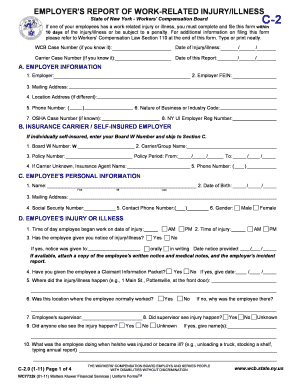
EMPLOYER'S REPORT OF WORK-RELATED INJURY/ILLNESS State of New York - Workers' Compensation Board If one of your employees has a work-related injury or illness, you must complete and file this form.

How it works

  1. Open form

    Open form follow the instructions

  2. Easily sign form

    Easily sign the form with your finger

  3. Share form

    Send filled & signed form or save

How to fill out the Employer's Report Of Work-Related Injury/Illness (C2.0) - Pdf online

Filing the Employer's Report of Work-Related Injury/Illness (C2.0) is a crucial step for employers in documenting workplace injuries or illnesses. This guide offers clear instructions to help you complete the form accurately and efficiently online.

Follow the steps to effectively complete the form online.

  1. Press the ‘Get Form’ button to access and open the Employer's Report of Work-Related Injury/Illness (C2.0) form in your browser.
  2. Fill in the top section of the form with the WCB Case Number, Date of Injury/Illness, and Date of this Report, ensuring that all fields are accurate and complete.
  3. In Section A, input your employer information: company name, Federal Employer Identification Number (FEIN), mailing address, and contact information. Remember to provide as much detail as possible.
  4. Proceed to Section B for insurance details. If you're using an insurance carrier, fill in the Carrier Code Number, name, policy number, and phone number. If self-insured, only enter your Carrier Code Number.
  5. Complete Section C with the employee's personal information. Provide their full legal name, date of birth, address, Social Security Number, contact phone number, and gender.
  6. In Section D, detail the injury or illness. Include the exact time of the injury, location, and a comprehensive description of how the injury occurred, along with any witnesses present.
  7. Fill out Section E by providing details on medical treatment. Include the date of first treatment, name of the treating physician, and any ongoing treatment the employee may be receiving.
  8. In Section F, indicate the employee's return to work status. Specify whether they stopped working, the date of return, and if they are working full or limited duty.
  9. Complete Section G by recording the employee’s hiring date, job title, and typical work activities. This section may require an attached job description for clarity.
  10. In Section H, document the employee's payroll information, including weekly pay and any tips or lodging benefits received.
  11. Provide any additional relevant information in Section I and ensure the form is properly signed at the end. If a third party completed it, they should also sign.
  12. Once the form is filled out, save your changes. You can then download, print, or share the completed form as needed.

Start completing your Employer's Report of Work-Related Injury/Illness (C2.0) online today to ensure compliance and proper documentation.

Get form

Experience a faster way to fill out and sign forms on the web. Access the most extensive library of templates available.
Get form

Related content

senate - US Government Publishing Office
REPORT OF ADMINISTRATOR OF REFUGEE RELIEF. ACT ... tain public works; to the Committee on...
Learn more
(PDF) HOLISTIC MARKETING IN THE FUNCTION OF ...
Finland`s EU Presidency (2006): The European Model of Agriculture ... Price KM 0,41 0,40...
Learn more

Related links form

Form Gf101 9 ADVANCE GROUP SALES ORDER FORM - Khsaa Crosscountryregionalinstructionsformanagersandteams.doc - Khsaa On The Job Training Form

Questions & Answers

Get answers to your most pressing questions about US Legal Forms API.

Contact support

The manager is the manager or boss of subordinate employees, but not the employer. The company, as an entity is the employer. If the company has a single or partnership owners, then those owners could be said to be the employers, since for most purposes they are.

>> An employer is an organization, institution, government entity, agency, company, professional services firm, nonprofit association, small business, store, or individual who employs or puts to work, a person who is called an employee or a staff member.

especially : a person or company that provides a job paying wages or a salary to one or more people.

No. The manager is the manager or boss of subordinate employees, but not the employer. The company, as an entity is the employer. If the company has a single or partnership owners, then those owners could be said to be the employers, since for most purposes they are.

' is simply that it is the company where you are working at present. Often, while filling out applications online or in-person, hiring managers may ask to list your current employer. So, if you work for a company called Wavewood, that would be your current employer.

Manager is a job title that's used in organizations to designate an employee who leads functions or departments, and often employees. A manager is assigned to a particular level on an organizational chart.

The employer definition is an individual or an organization in the government, private, nonprofit, or business sector that hires and pays people for their work. As the authority within an organization, the employer defines the terms of employment for employees and provides the agreed-upon terms such as the salary.

Get This Form Now!

Use professional pre-built templates to fill in and sign documents online faster. Get access to thousands of forms.
Get form
If you believe that this page should be taken down, please follow our DMCA take down processhere.

Industry-leading security and compliance

US Legal Forms protects your data by complying with industry-specific security standards.
  • In businnes since 1997
    25+ years providing professional legal documents.
  • Accredited business
    Guarantees that a business meets BBB accreditation standards in the US and Canada.
  • Secured by Braintree
    Validated Level 1 PCI DSS compliant payment gateway that accepts most major credit and debit card brands from across the globe.
Get Employer's Report Of Work - Related Injury/Illness (C2.0) - Pdf
Get form
Form Packages
Adoption
Bankruptcy
Contractors
Divorce
Home Sales
Employment
Identity Theft
Incorporation
Landlord Tenant
Living Trust
Name Change
Personal Planning
Small Business
Wills & Estates
Packages A-Z
Form Categories
Affidavits
Bankruptcy
Bill of Sale
Corporate - LLC
Divorce
Employment
Identity Theft
Internet Technology
Landlord Tenant
Living Wills
Name Change
Power of Attorney
Real Estate
Small Estates
Wills
All Forms
Forms A-Z
Form Library
Customer Service
Terms of Service
Privacy Notice
Legal Hub
Content Takedown Policy
Bug Bounty Program
About Us
Help Portal
Legal Resources
Blog
Affiliates
Contact Us
Delete My Account
Site Map
Industries
Forms in Spanish
Localized Forms
State-specific Forms
Forms Kit
Legal Guides
Real Estate Handbook
All Guides
Prepared for You
Notarize
Incorporation services
Our Customers
For Consumers
For Small Business
For Attorneys
Our Sites
US Legal Forms
USLegal
FormsPass
pdfFiller
signNow
airSlate WorkFlow
DocHub
Instapage
Social Media
Call us now toll free:
+1 833 426 79 33
As seen in:
  • USA Today logo picture
  • CBC News logo picture
  • LA Times logo picture
  • The Washington Post logo picture
  • AP logo picture
  • Forbes logo picture
© Copyright 1997-2025
airSlate Legal Forms, Inc.
3720 Flowood Dr, Flowood, Mississippi 39232
Form Packages
Adoption
Bankruptcy
Contractors
Divorce
Home Sales
Employment
Identity Theft
Incorporation
Landlord Tenant
Living Trust
Name Change
Personal Planning
Small Business
Wills & Estates
Packages A-Z
Form Categories
Affidavits
Bankruptcy
Bill of Sale
Corporate - LLC
Divorce
Employment
Identity Theft
Internet Technology
Landlord Tenant
Living Wills
Name Change
Power of Attorney
Real Estate
Small Estates
Wills
All Forms
Forms A-Z
Form Library
Customer Service
Terms of Service
Privacy Notice
Legal Hub
Content Takedown Policy
Bug Bounty Program
About Us
Help Portal
Legal Resources
Blog
Affiliates
Contact Us
Delete My Account
Site Map
Industries
Forms in Spanish
Localized Forms
State-specific Forms
Forms Kit
Legal Guides
Real Estate Handbook
All Guides
Prepared for You
Notarize
Incorporation services
Our Customers
For Consumers
For Small Business
For Attorneys
Our Sites
US Legal Forms
USLegal
FormsPass
pdfFiller
signNow
airSlate WorkFlow
DocHub
Instapage
Social Media
Call us now toll free:
+1 833 426 79 33
As seen in:
  • USA Today logo picture
  • CBC News logo picture
  • LA Times logo picture
  • The Washington Post logo picture
  • AP logo picture
  • Forbes logo picture
© Copyright 1997-2025
airSlate Legal Forms, Inc.
3720 Flowood Dr, Flowood, Mississippi 39232