Loading
Get Liquor License Application - City Of Prior Lake
How it works
-

Open form follow the instructions
-

Easily sign the form with your finger
-

Send filled & signed form or save
How to fill out the Liquor License Application - City Of Prior Lake online
Filling out the Liquor License Application for the City of Prior Lake can seem daunting, but with clear guidance, you can complete it effectively. This guide provides a detailed breakdown of each section to support you in the online application process.
Follow the steps to successfully complete the application.
- Press the ‘Get Form’ button to access the Liquor License Application and open it in your preferred online editor.
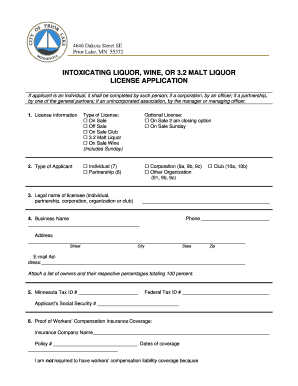
- Begin by selecting the type of license you are applying for. Choose one of the options: On Sale, Off Sale, On Sale Club, 3.2 Malt Liquor, or On Sale Wine (which includes Sunday).
- Next, designate the type of applicant. Options include Individual, Partnership, Corporation, or Other Organization. Only select one.
- Provide the legal name of the licensee, whether that is an individual, partnership, corporation, or club, and include a contact phone number.
- Enter the business name and address including street, city, state, and zip code. Additionally, input a valid email address. Remember to attach a list of owners and their ownership percentages summing to 100%.
- Fill in your Minnesota Tax ID number, Federal Tax ID number, and the applicant’s Social Security number.
- Prove your Workers’ Compensation Insurance coverage by including the insurance company name, policy number, and coverage dates. If you do not require coverage, state the reason.
- Complete Section 1 according to your applicant type. For individuals, provide full name, residence address, and business address. For partnerships and corporations, provide the necessary details about each partner or officer.
- In Section 2, list all individuals responsible for the licensed premises, including their name and position.
- Section 3 pertains to building ownership. State whether the applicant owns the building and provide the date purchased, purchase price, and owner details if applicable.
- Proceed to Section 4 to describe the licensed premises and attach a floor plan indicating seating capacity.
- Complete additional questions about zoning, outstanding taxes, and specifics related to on sale or off sale liquor licenses as applicable.
- In Section 7, confirm if alcohol awareness training is provided for staff and detail the frequency and provider.
- Finally, complete the notice and signature section, ensuring all information is accurate. Print, sign, and date the application. Then, save your changes, download, or print the completed form as needed.
Begin your application process online today!
Related links form
Addressable Advertising On Digital Television - Homepages The ...
Confirmation Of Arrival Form - University Of Aberdeen - Abdn Ac
ACRP Report 40 Airport Curbside And Terminal Area Roadway ... - Onlinepubs Trb
NCHRP Synthesis 334 ? Automated Pavement Distress Collection Techniques. TRB?s National Cooperative
What is the Assignment Clause and When is it Triggered? Every commercial lease contains an assignment provision that lays out the landlord's and the tenant's rights and obligations in the event that the tenant seeks to “assign” the lease.
Industry-leading security and compliance
US Legal Forms protects your data by complying with industry-specific security standards.
-
In businnes since 199725+ years providing professional legal documents.
-
Accredited businessGuarantees that a business meets BBB accreditation standards in the US and Canada.
-
Secured by BraintreeValidated Level 1 PCI DSS compliant payment gateway that accepts most major credit and debit card brands from across the globe.