Loading
Get Return - Washington State Department Of Revenue - Dor Wa
How it works
-

Open form follow the instructions
-

Easily sign the form with your finger
-

Send filled & signed form or save
How to fill out the Return - Washington State Department Of Revenue - Dor Wa online
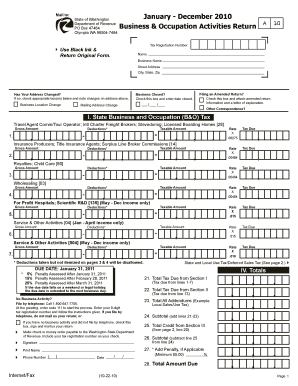
Filing your Business & Occupation Activities Return online with the Washington State Department of Revenue can streamline the process and ensure accuracy. This guide will walk you through each section of the return, providing step-by-step instructions that are easy to follow, regardless of your previous experience with tax forms.
Follow the steps to successfully complete the Return online.
- Click ‘Get Form’ button to obtain the form and open it for editing. This will allow you to start filling out the required information.
- Begin by entering your tax registration number in the designated field, ensuring you keep all entries clear and legible.
- Fill in your name, business name, and address. If your address has changed, check the appropriate box and note the updated information.
- Indicate if you are filing an amended return by checking the respective box and attaching the necessary explanation.
- If your business has closed, check the box provided and enter the date of closure.
- Complete Section I regarding State Business and Occupation (B&O) Tax by entering the gross amount for each applicable category and calculating the deductions to find the taxable amount.
- Proceed to Section II to fill out the State and Local Use Tax section, ensuring you enter gross amounts and calculate the corresponding tax rates based on your reported activities.
- In Section III, apply for any available credits by entering their amounts and providing necessary documentation.
- Review all entered data for accuracy before moving on to calculate the total taxes due, penalties if applicable, and the final amount owed.
- After ensuring all sections are accurately filled, you can save changes, download, print, or share the completed form.
Complete your documents online today for a smoother filing experience.
Mail your return in a USPS® blue collection box or at a Postal location that has a pickup time before the deadline. Some Post Office™ locations offer extended hours and late postmarking for tax filers. Call a Post Office near you to find out if it will be open late on tax day.
Industry-leading security and compliance
US Legal Forms protects your data by complying with industry-specific security standards.
-
In businnes since 199725+ years providing professional legal documents.
-
Accredited businessGuarantees that a business meets BBB accreditation standards in the US and Canada.
-
Secured by BraintreeValidated Level 1 PCI DSS compliant payment gateway that accepts most major credit and debit card brands from across the globe.